

你可能會喜歡


🚀 New Course Launch! AWS CDK v2 with TypeScript Learn to define & deploy AWS infrastructure in code. Hands-on projects: S3, Lambda, API Gateway, DynamoDB, SQS, Cognito & more. Enroll now & build like a pro! udemy.com/course/aws-cdk… #AWS #CDK #TypeScript #CloudComputing

🚨 New Course Alert! 🚨 Practical Git and GitHub: From Basics to Pro Workflows ✅ Real-world Git commands ✅ VSCode + Terminal workflows ✅ Interactive rebase, cherry-pick & more 🎯 udemy.com/course/practic… 🎟 Code: GIT-GITHUB-COURSE ⏳ Offer ends June 11, 2025

🚨 New Course Alert! 🚨 Practical Git and GitHub: From Basics to Pro Workflows ✅ Hands-on Git commands ✅ Real-world workflows (merge, rebase, cherry-pick) ✅ Terminal + VSCode examples Perfect for devs who want to master Git without the fluff.
The limits of AI in programming | Tim Sweeney and Lex Fridman youtu.be/lR21C8cNx2o?si… via @YouTube

youtube.com
YouTube
The limits of AI in programming | Tim Sweeney and Lex Fridman
The more time I spend in production code, the more I realize how out of touch many YouTube coding influencers are. Their takes on “clean code,” “best practices,” and what it means to be a senior dev often crumble in the face of real-world constraints, and legacy systems 😂
🚀 New Course Alert! Master Jest Testing with TypeScript & Node.js Learn how to write clean, reliable tests with real-world examples. Unit tests, mocks, spies, error handling & more! 🎯 Enroll now → udemy.com/course/masteri…

Just installed webpack-bundle-analyzer — love the 🔥 graphical breakdown of my bundle! Makes spotting bloat so much easier 📊🕵️♂️ Not using Webpack? Check out source-map-explorer or vite-plugin-visualizer 💡 #webpack #webperf #javascript
Spicy take 🌶️: For all the talk about TypeScript "overcomplicating" things, it’s actually saving your team from chaos 😅
🔍 Want to see where a dependency is used in your project? Run this command: 👉 npm ls package-name It shows the full dependency tree 🌳 Super useful for tracking down nested dependencies 🕵️♂️ #npm #javascript #nodejs #webdev
Hot take 🔥 : in production, SourceTree ⏩ Git CLI. Look, I ❤️ terminal too, but when it’s time to rebase, merge, and cherry-pick in prod - most times clicking 🖱️ is faster than rewriting the same conflict 3 times—or summoning the Git gods with a ritual sacrifice. 🔥
Using a this hack in tests: 🔁 const resetSingleton = () => (HashingService as any).instance = undefined; 🔧 Calling this in beforeEach() to reset singleton state. 🕵️♂️ In general, (SomeClass as any) helps "cheat" TypeScript when tests need to bypass strict typing. #TypeScript#Jest
Spent an hour debugging a mysterious TypeScript error 😵💫 Turns out... .webpackCache was the culprit 🧨 Deleted it, and everything worked like magic ✨ #webpack #devlife #typescript 🛠️
🧠 TypeScript fun fact! 🧠 The declare keyword only provides type information but NO runtime values! declare enum Colors { RED, BLUE } console.log(Colors.RED) // 💥 Crash! Remove declare if you need actual values at runtime 😀
🔍 Dev Tip: Lookup Tables FTW! 📚 Ditch long if/switch statements—use object mapping instead! 🚀 Examples: ✅ Convert status codes to messages ✅ Map country codes to names ✅ Translate enums 💡 const result = lookupTable[input] || defaultValue; Fast, and easy to maintain! ⚡
![codingaddict_lv's tweet image. 🔍 Dev Tip: Lookup Tables FTW! 📚
Ditch long if/switch statements—use object mapping instead!
🚀 Examples:
✅ Convert status codes to messages
✅ Map country codes to names
✅ Translate enums
💡 const result = lookupTable[input] || defaultValue;
Fast, and easy to maintain! ⚡](https://pbs.twimg.com/media/GlLjXByXsAAht5Q.jpg)
![codingaddict_lv's tweet image. 🔍 Dev Tip: Lookup Tables FTW! 📚
Ditch long if/switch statements—use object mapping instead!
🚀 Examples:
✅ Convert status codes to messages
✅ Map country codes to names
✅ Translate enums
💡 const result = lookupTable[input] || defaultValue;
Fast, and easy to maintain! ⚡](https://pbs.twimg.com/media/GlLjXByWQAAd8F4.jpg)
![codingaddict_lv's tweet image. 🔍 Dev Tip: Lookup Tables FTW! 📚
Ditch long if/switch statements—use object mapping instead!
🚀 Examples:
✅ Convert status codes to messages
✅ Map country codes to names
✅ Translate enums
💡 const result = lookupTable[input] || defaultValue;
Fast, and easy to maintain! ⚡](https://pbs.twimg.com/media/GlLjXBzW0AA7s68.jpg)
🚀 Generate minimal .d.ts files with dts-bundle-generator 📦 npm install --save-dev dts-bundle-generator 📂 mkdir -p types (if missing) ⚡ npx dts-bundle-generator -o types/utils.d.ts src/utils.ts 🔍 Extracts only needed types & dependencies!
🧪 Jest Mocking Gotcha! 🔥 Issue: 👉 jest.mock('./myModule'); 🚨 Returns undefined for EVERYTHING! 🫥 ⚡ Your code: 👉 myModule.doStuff() 💥 Cannot read property 'doStuff' of undefined 🛠 Fix: jest.mock('./myModule', () => ({ doStuff: jest.fn() })); #JavaScript #Testing #Jest
🔍 Git tip: Deleted files not showing up in staging? git add -A The -A flag is your friend! It stages ALL changes: • New files ✨ • Modified files 📝 • Deleted files 🗑️ • Renamed files 🔄 No more ghost files in your staging area! 🎯 #Git #DevTips #CodingTips
🧪 Jest Testing Tip: Run single test file: 👉 "npm test -- yourFileName.spec.ts" OR directly with Jest: 👉 "jest -- yourFileName.spec.ts" Pro tip: Arrow ⬆️ key is your friend for finding recent commands! No config changes needed 🚀 #JavaScript #Testing
🔧 NVM #DevTip: VS Code terminal showing a different Node version than your system terminal? Add this to your .zshrc: 👉 "nvm use default" 🎯 Boom! Now both terminals stay in sync with your default Node version. No more version mismatches!
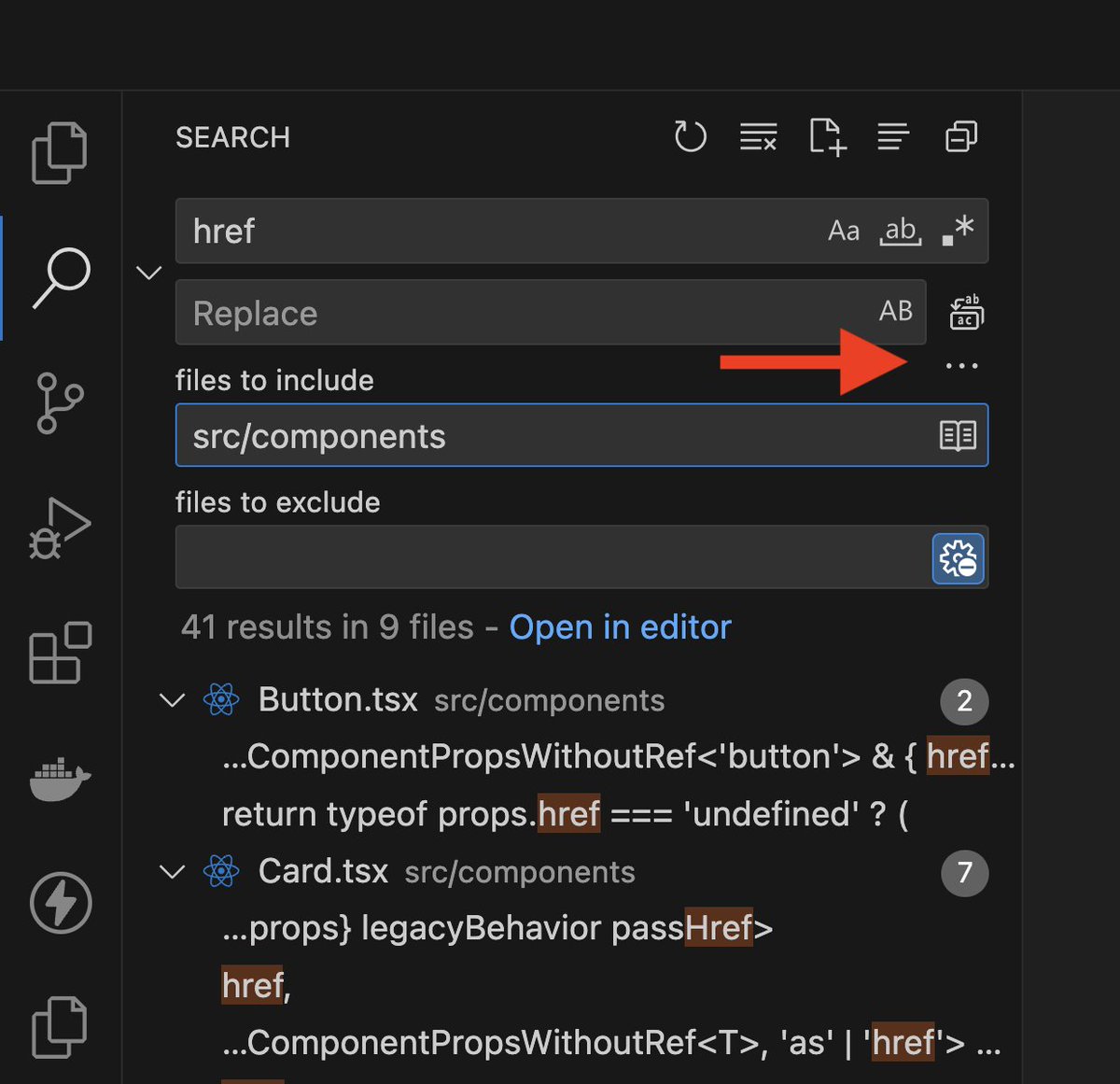
Need to search only in a specific folder in VS Code? - Press `Ctrl + Shift + F` (`Cmd + Shift + F` on Mac) - In **'files to include'**, type `src/components/**` - To exclude folders, use **'files to exclude'**, e.g., `node_modules/**` - Get focused search results! 🚀
























































































United States 趨勢
- 1. The BONK 104K posts
- 2. FINALLY DID IT 564K posts
- 3. Good Tuesday 30.4K posts
- 4. #Nifty 11.6K posts
- 5. $FULC 10.4K posts
- 6. US Leading Investment Team 6,824 posts
- 7. Jalen 78.1K posts
- 8. Eagles 120K posts
- 9. Judah 3,951 posts
- 10. Chargers 88K posts
- 11. Chainers 1,786 posts
- 12. LINGLING BA HAUS64 441K posts
- 13. #tuesdayvibe 1,634 posts
- 14. #Haus64xLingMOME 444K posts
- 15. Piers 88.7K posts
- 16. #QG494 N/A
- 17. Herbert 34.3K posts
- 18. Oslo 73.6K posts
- 19. Jasmine Crockett 83K posts
- 20. AJ Brown 10.9K posts
你可能會喜歡
-
 Angela Yu
@yu_angela -
 Web Dev Simplified
@DevSimplified -
 Lama Dev
@lamaWebDev -
 Scrimba
@scrimba -
 Monsterlessons Academy
@monster_lessons -
 Piyush Agarwal ( RoadsideCoder on YT )
@Piyush_eon -
 Florin Pop 👨🏻💻
@FlorinPop17 -
 Marko Denic
@denicmarko -
 Csaba Kissi
@csaba_kissi -
 Brad Traversy
@traversymedia -
 Lee Robinson
@leerob -
 Vishwas (Builder.io)
@CodevolutionWeb -
 Medical_Courses🚑💉
@MCourses2020 -
 Hashnode
@hashnode -
 Prof. K.Nageshwar
@K_Nageshwar
Something went wrong.
Something went wrong.