
#modeldrivenapp 搜尋結果

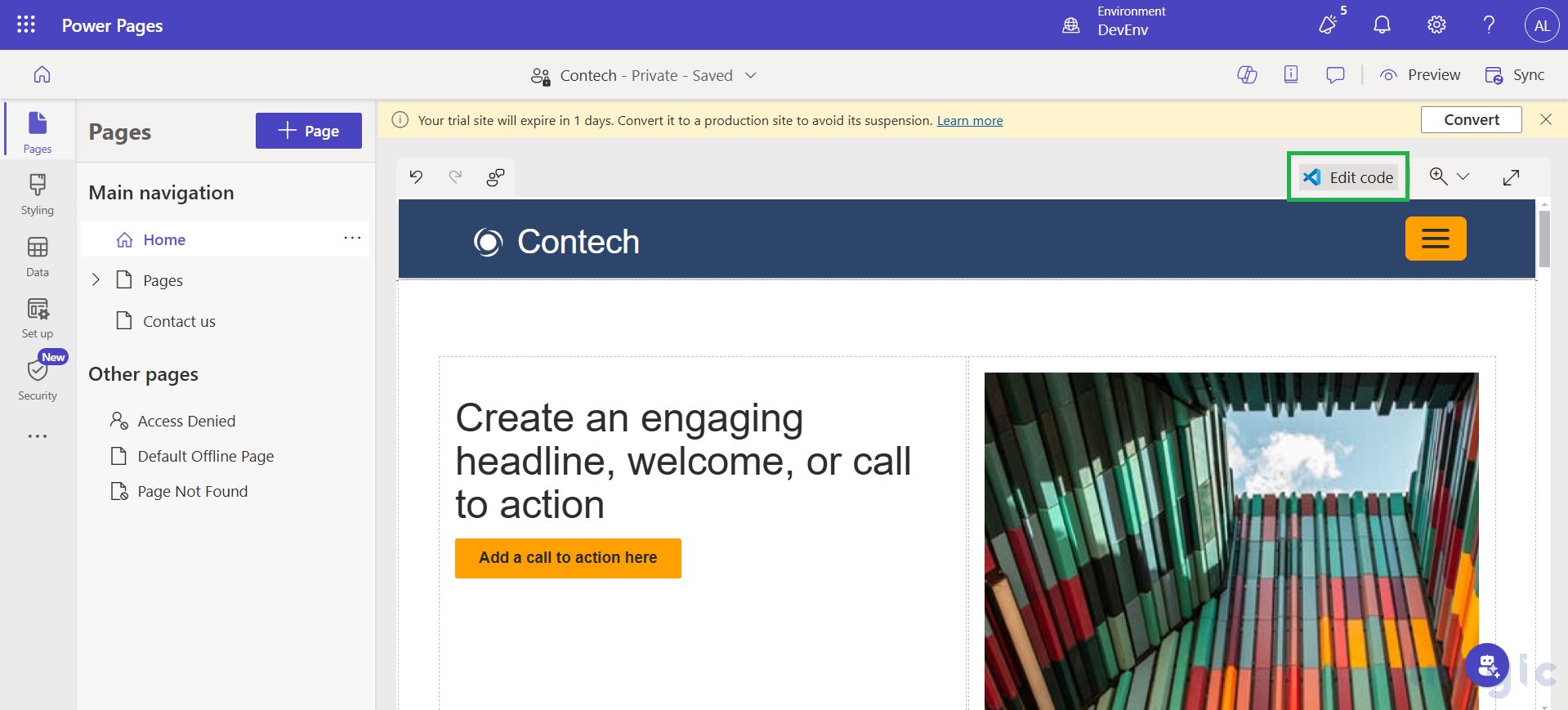
How to Add a Model-Driven App Chart to a Power Pages Portal using Liquid Code @inogic inogic.com/blog/2025/02/h… #LiquidCode #ModelDrivenApp #PowerPages #VisualStudio

New blog post Learn how to disable the folder id when using the SharePoint document integration in #Dynamics365 #ModelDrivenApp alexanderhenkel.dk/post/model-dri…

New blog Learn how to create a custom button in #Dynamics365 #modeldrivenapp with the modern ribbon, and how to change a choice/option set value alexanderhenkel.dk/post/model-dri…


First draft of an AI assisted Form in a #PowerApps #ModelDrivenApp The whole Tab is a #CustomPage which you (hopefully) didn't notice on first glance

There is some progress in the #ModelDrivenApp Command Bar! You can now customize (or hide) the +New Button without the help of @ScottDurow #RibbonWorkBench You can for example jump to a #CustomPage to create a record with a few lines of #JavaScript 🩷 (De)Activate buttons as well
New blog post Learn how to trigger a #powerautomate flow in a #ModelDrivenApp ( #Dynamics365 ) with a custom button, using the modern ribbon (not Ribbon Workbench ♥) alexanderhenkel.dk/post/model-dri…


Blogged! Setting a #GUID in a #ModelDrivenapp using #Javascript! The most technical thing I have ever done. Kudos to @YerAWizardCat and a friend of mine for their assistance. 🧡 #sharingiscaring #powerplatform #procode #communityrocks #communityluv blog.nathalieleenders.com/posts/guidjava…

Blogged! 💡 Using the #commandbar in #ModelDrivenApp to create a button, to send an email in the #outlook client pre-populated 🧡🙏 Inspired by the awesome @ScottDurow #powerplatformconnects #communityrocks #communityluv #poweraddicts blog.nathalieleenders.com/posts/commandb…


I've noticed that the Security Role's Classic View in Dynamics CRM and Model-Driven App has been updated to a new version. Seems like this change is gaining traction among users! #DynamicsCRM #ModelDrivenApp #SecurityRoles Bosch Global Software Technologies Devikumari Krishna


#UX #UI for #ModelDrivenApp #PowerApps Minimize the number of fields on your form. The more fields you have, the less likely users are to complete the form. Trim the form down. Start by reviewing all “optional” fields. If it’s optional, do you really need it?

I had a free evening so I was able to polish and publish my "Entity Navigator" extension for #ModelDrivenApp and wrote a blog post that described the main solution elements - butenko.pro/2024/06/03/cre…
butenko.pro
Creating Model Driven Apps Side Panels like a boss - Andrew Butenko's Blog
If you use model-driven applications regularly you might notice a “Copilot” Side Pane that appears immediately after your app (Sales/Service/Marketing/Something Else) is loaded: I decided to invest...
Want to use a #CanvasApp or #CustomPage inside the form of a #ModelDrivenApp? I had lots of problems with the standard Canvas Integration, so this is my prefered way! Here I describe how to set everything up with an environment variable and some html: github.com/PowerRobin/Mod…

With CollapsibleSection-PCF for #PowerApps #ModelDrivenApp you can: Easily add expand/collapse toggles to any form section Reduce clutter without complex scripting Improve user focus by showing only what’s needed.
Small change, big impact. It keeps your forms clean, avoids jarring UI transitions, and shows attention to detail. Great UX isn’t just about features and design, it can be that little distraction. #PowerApps #ModelDrivenApp #UXTips #powerAppUX
#UX tip for #ModelDrivenApp #PowerApps Still on the Law of Proximity—in MDA Forms: Group related fields visually close together. Users assume proximity = relation.
Been enhancing #ModelDrivenApp with PCF controls lately, and every day I discover new tricks, gaps, and better ways to improve the experience. The more I build, the more I realise how much room there is to push MDA further. #PowerApps #Dataverse #LowCode
#UX tip for #ModelDrivenApp #PowerApps Did you know ? Instead of chaining multiple filtered lookups field (Country >> Region >> Department >> Unit), you can simplify with one lookup. Multiple lookups take up space and force users through extra clicks just to get to the final.
#UX tip for #ModelDrivenApp #PowerApps Be intentional with your primary field. This is the first thing users see in lookups, subgrids, and views. it’s your first point of contact. If the primary field isn’t clear, users waste time guessing or opening records unnecessarily.
#UX tip for #ModelDrivenApp #PowerApps Keep notifications in context. Instead of form level alerts, use control-level notifications to stay within the user’s focus. Per the Law of Proximity (Laws of UX), related info should stay visually grouped. This improves clarity.
I finally decided to stick with value. Ended up adding a simple button to the control to reset the state and clear the data manually. Works as expected, and keeps the behavior predictable; especially in controlled scenarios. #PCF #FluentUI #ModelDrivenApp #PowerApps

How to Add a Model-Driven App Chart to a Power Pages Portal using Liquid Code @inogic inogic.com/blog/2025/02/h… #LiquidCode #ModelDrivenApp #PowerPages #VisualStudio

How to Add a Model-Driven App Chart to a Power Pages Portal using Liquid Code inogic.com/blog/2025/02/h… #LiquidCode #ModelDrivenApp #PowerPages #VisualStudio
How to Add a Model-Driven App Chart to a Power Pages Portal using Liquid Code @inogic inogic.com/blog/2025/02/h… #LiquidCode #ModelDrivenApp #PowerPages #VisualStudio
How to Add a Model-Driven App Chart to a Power Pages Portal using Liquid Code bit.ly/4hZ5O8J #powerpages #modeldrivenapp #liquidcode
How to Add a Model-Driven App Chart to a Power Pages Portal using Liquid Code bit.ly/4hZ5O8J #powerpages #modeldrivenapp #liquidcode
I finally decided to stick with value. Ended up adding a simple button to the control to reset the state and clear the data manually. Works as expected, and keeps the behavior predictable; especially in controlled scenarios. #PCF #FluentUI #ModelDrivenApp #PowerApps
But defaultValue doesn’t trigger reactions. it only works on initial load. Best option? Still unknown 😌. react.fluentui.dev/?path=/docs/co… Components / Combobox - Docs ⋅ Storybook #PCF #FluentUI #ModelDrivenApp #PowerApps #react
Been enhancing #ModelDrivenApp with PCF controls lately, and every day I discover new tricks, gaps, and better ways to improve the experience. The more I build, the more I realise how much room there is to push MDA further. #PowerApps #Dataverse #LowCode
#UX tip for #ModelDrivenApp #PowerApps Be intentional with your primary field. This is the first thing users see in lookups, subgrids, and views. it’s your first point of contact. If the primary field isn’t clear, users waste time guessing or opening records unnecessarily.
#UX tip for #ModelDrivenApp #PowerApps Did you know ? Instead of chaining multiple filtered lookups field (Country >> Region >> Department >> Unit), you can simplify with one lookup. Multiple lookups take up space and force users through extra clicks just to get to the final.
#UX #UI for #ModelDrivenApp #PowerApps Minimize the number of fields on your form. The more fields you have, the less likely users are to complete the form. Trim the form down. Start by reviewing all “optional” fields. If it’s optional, do you really need it?
With CollapsibleSection-PCF for #PowerApps #ModelDrivenApp you can: Easily add expand/collapse toggles to any form section Reduce clutter without complex scripting Improve user focus by showing only what’s needed.
#UX for #ModelDrivenApp #PowerApps: Hide irrelevant fields and collapse sections to reduce cognitive load. Every visible field competes for attention. When users only see what’s needed right now, they navigate forms faster, with less confusion.
#UX tip for #ModelDrivenApp #PowerApps Still on the Law of Proximity—in MDA Forms: Group related fields visually close together. Users assume proximity = relation.
#UX tip for #ModelDrivenApp #PowerApps Still on the Law of Proximity—in MDA Forms: Group related fields visually close together. Users assume proximity = relation.
“Objects that are near, or proximate to each other, are perceived as related.” - Law of Proximity Keep user within context. Make error notification obvious but not overwhelming. #PowerPlatform #LowCode #ModelDrivenApp
#UX tip for #ModelDrivenApp #PowerApps Keep notifications in context. Instead of form level alerts, use control-level notifications to stay within the user’s focus. Per the Law of Proximity (Laws of UX), related info should stay visually grouped. This improves clarity.
How to Add a Model-Driven App Chart to a Power Pages Portal using Liquid Code bit.ly/4hZ5O8J #powerpages #modeldrivenapp #liquidcode
How to Add a Model-Driven App Chart to a Power Pages Portal using Liquid Code bit.ly/4hZ5O8J #powerpages #modeldrivenapp #liquidcode
How to Add a Model-Driven App Chart to a Power Pages Portal using Liquid Code @inogic bit.ly/4hZ5O8J #LiquidCode #ModelDrivenApp #PowerPages #VisualStudio
Small change, big impact. It keeps your forms clean, avoids jarring UI transitions, and shows attention to detail. Great UX isn’t just about features and design, it can be that little distraction. #PowerApps #ModelDrivenApp #UXTips #powerAppUX
Something went wrong.
Something went wrong.
United States Trends
- 1. #WWERaw 38.6K posts
- 2. Giants 57.3K posts
- 3. Giants 57.3K posts
- 4. Patriots 85.1K posts
- 5. Drake Maye 13.5K posts
- 6. Dart 23.9K posts
- 7. Younghoe Koo 2,296 posts
- 8. Marcus Jones 5,107 posts
- 9. Diaz 30.8K posts
- 10. Abdul Carter 6,172 posts
- 11. Devin Williams 2,758 posts
- 12. Kyle Williams 3,278 posts
- 13. Theo Johnson 1,627 posts
- 14. #NYGvsNE 1,433 posts
- 15. LA Knight 8,891 posts
- 16. #RawOnNetflix 1,293 posts
- 17. Elliss 2,579 posts
- 18. #MondayNightFootball 1,005 posts
- 19. Bron Breakker 4,438 posts
- 20. Ty Lue 1,063 posts