

Follow for daily Python tips, coding challenges, and insights! Check out this fun Python project! Here’s how to create a radiating heart animation using matplotlib. Perfect for adding a little creativity to your coding skills! 💻❤️ #Python #Coding #Animation #PythonTips

Errors are part of the Python journey—but understanding them makes debugging easier! #PythonTricks #python #pythonprogramming #coding

Writing better Python is an art! 🎨 Here's a quick tip to optimize your code for readability and efficiency. ✨ Before vs. After ⬇️ #PythonTips #CodeBetter #pythonlearning #coding #Pythonista

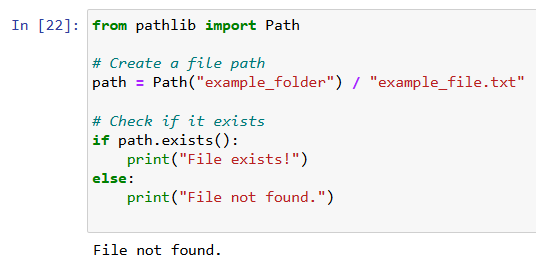
Stop struggling with os for file paths. Use pathlib for clean, readable, cross-platform file handling in Python!#PythonTricks #python #pythonprogramming #coding
Need to unpack a long list of values? Use the magic of * to keep your code clean and readable. #PythonTricks #python #pythonprogramming #coding

Create clean, readable classes in seconds using dataclasses. #PythonTricks #python #pythonprogramming #coding

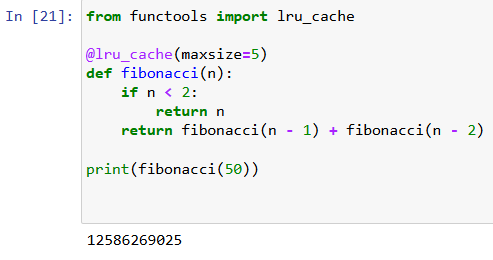
Speed up your Python functions with just ONE line! Use functools.lru_cache to cache results of expensive function calls. Perfect for recursion & data-intensive tasks.#PythonTricks #python #pythonprogramming #coding
Enumerate can be used to tracking indices—with custom starting points. #PythonTricks #python #pythonprogramming --- # Enumerate with a custom start index my_list = ['Python', 'Rocks', 'Hard'] for index, value in enumerate(my_list, start=100): print(f"{index}: {value}") ---
![PythonTipsHQ's tweet image. Enumerate can be used to tracking indices—with custom starting points.
#PythonTricks #python #pythonprogramming
---
# Enumerate with a custom start index
my_list = ['Python', 'Rocks', 'Hard']
for index, value in enumerate(my_list, start=100):
print(f"{index}: {value}")
---](https://pbs.twimg.com/media/GcsdtSmWkAE651R.png)
Python's zip for combining list and split lists back apart. --- list1=[1, 2, 3] list2=['a', 'b', 'c'] # Combine zipped = list(zip(list1, list2)) print(zipped) # Split unzipped = zip(*zipped) list1_split, list2_split = map(list, unzipped) print(list1_split, list2_split) ---
![PythonTipsHQ's tweet image. Python's zip for combining list and split lists back apart.
---
list1=[1, 2, 3]
list2=['a', 'b', 'c']
# Combine
zipped = list(zip(list1, list2))
print(zipped)
# Split
unzipped = zip(*zipped)
list1_split, list2_split = map(list, unzipped)
print(list1_split, list2_split)
---](https://pbs.twimg.com/media/GcsenlKXMAAxCMq.png)
Sorting isn't just ascending or descending—sorted can use custom keys to unlock advanced functionality! #PythonTricks #pythonprogramming ---- # Sort by string length names = ["Alice", "Bob", "Christina", "Daniel"] sorted_names = sorted(names, key=len) print(sorted_names) ----
![PythonTipsHQ's tweet image. Sorting isn't just ascending or descending—sorted can use custom keys to unlock advanced functionality! #PythonTricks #pythonprogramming
----
# Sort by string length
names = ["Alice", "Bob", "Christina", "Daniel"]
sorted_names = sorted(names, key=len)
print(sorted_names)
----](https://pbs.twimg.com/media/GcsfgR3XMAAbXuW.png)
We can flatten lists with this one-liner for clean, readable code. #PythonTricks #python #pythonprogramming #pythonlearning . ---- # Flatten a 2D list into 1D matrix = [[1, 2], [3, 4], [5, 6]] flat_list = [item for sublist in matrix for item in sublist] print(flat_list) ----
![PythonTipsHQ's tweet image. We can flatten lists with this one-liner for clean, readable code. #PythonTricks #python #pythonprogramming #pythonlearning .
----
# Flatten a 2D list into 1D
matrix = [[1, 2], [3, 4], [5, 6]]
flat_list = [item for sublist in matrix for item in sublist]
print(flat_list)
----](https://pbs.twimg.com/media/GcsgIs3XQAEXnPG.png)
We can get rid of KeyError! defaultdict lets you set default values for missing keys easily. #PythonTricks #python #pythonprogramming #coding ---- from collections import defaultdict scores = defaultdict(int) scores['Python'] += 1 scores['Data Science'] += 2 print(scores) ----
![PythonTipsHQ's tweet image. We can get rid of KeyError! defaultdict lets you set default values for missing keys easily. #PythonTricks #python #pythonprogramming #coding
----
from collections import defaultdict
scores = defaultdict(int)
scores['Python'] += 1
scores['Data Science'] += 2
print(scores)
----](https://pbs.twimg.com/media/Gcsg7WTXAAAfZ5J.png)































































United States 트렌드
- 1. #NicolandriaxGlamour 5,452 posts
- 2. Good Thursday 34.6K posts
- 3. #DareYouToDeathEP1 652K posts
- 4. Happy Friday Eve N/A
- 5. Core CPI 5,297 posts
- 6. TAE Technologies N/A
- 7. #thursdayvibes 2,127 posts
- 8. #ThursdayThoughts 2,143 posts
- 9. Disturbed 7,139 posts
- 10. November CPI 3,257 posts
- 11. Cardinal Dolan 1,565 posts
- 12. Ally 32.2K posts
- 13. #thursdaymorning N/A
- 14. Cartoon Network 2,080 posts
- 15. Trump Media 39.5K posts
- 16. Thankful Thursday N/A
- 17. Newt 4,070 posts
- 18. Gareth Bale 1,995 posts
- 19. Keith Richards 8,846 posts
- 20. Nickelodeon 2,169 posts
Something went wrong.
Something went wrong.