

𝐓𝐞𝐜𝐡 𝐓𝐢𝐩: View recently copied text and images 𝐏𝐮𝐫𝐩𝐨𝐬𝐞: Reuse and view recent copied text without needing to copy again 𝐈𝐧𝐬𝐭𝐫𝐮𝐜𝐭𝐢𝐨𝐧𝐬: Press Windows key + V
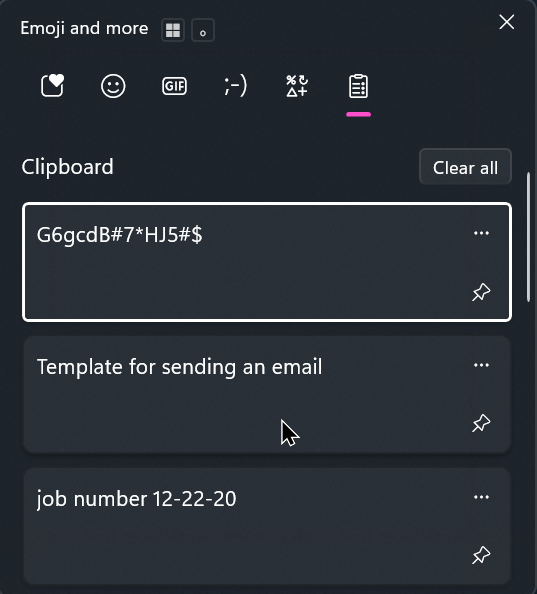
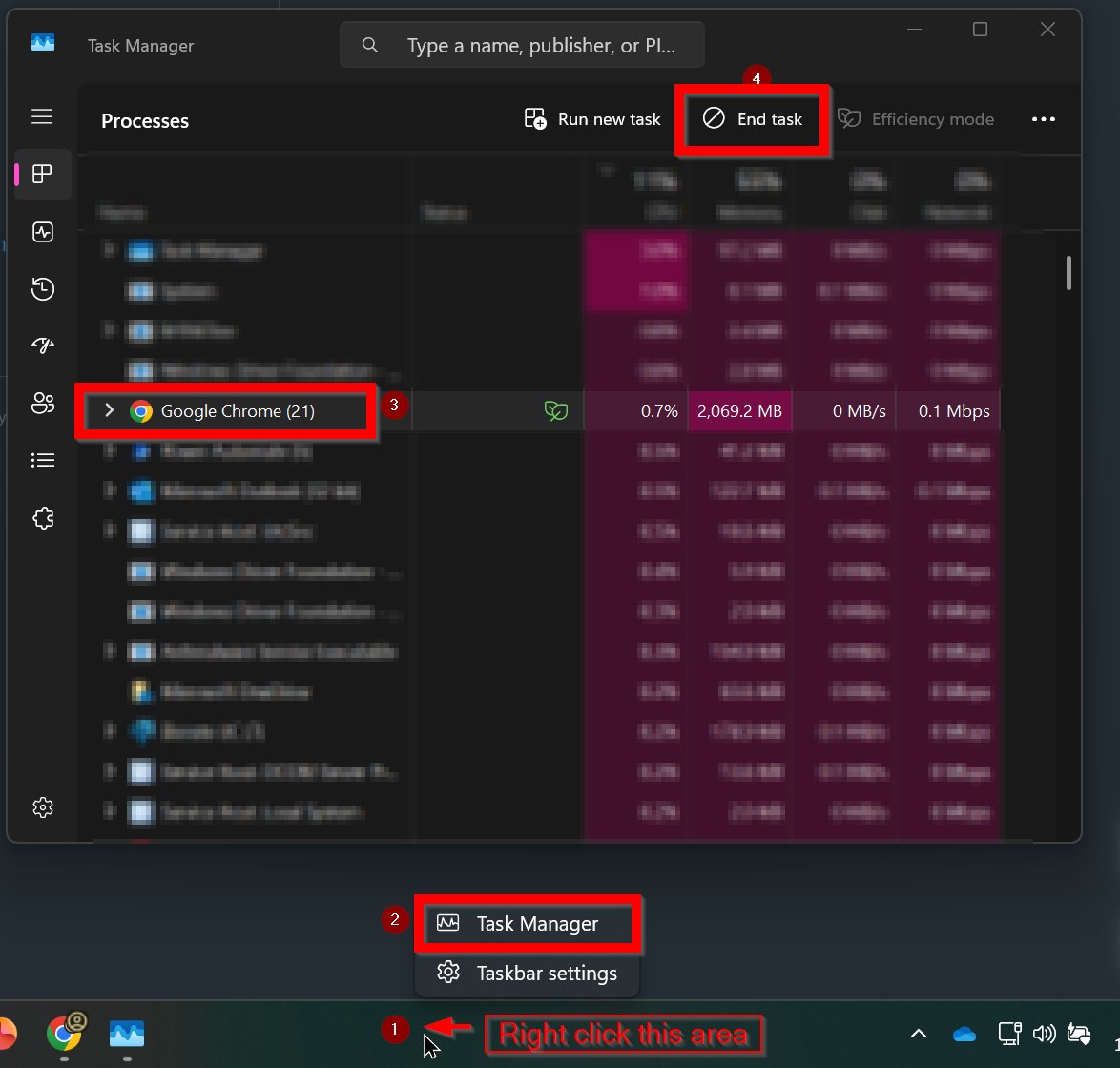
𝐓𝐞𝐜𝐡 𝐓𝐢𝐩: Close any application if frozen 𝐏𝐮𝐫𝐩𝐨𝐬𝐞: Free up system resources and regain control of any application without restarting the computer 𝐈𝐧𝐬𝐭𝐫𝐮𝐜𝐭𝐢𝐨𝐧𝐬: 1. Right click bottom bar 2. Click Task Manager 3. Choose the application 4. Click End task
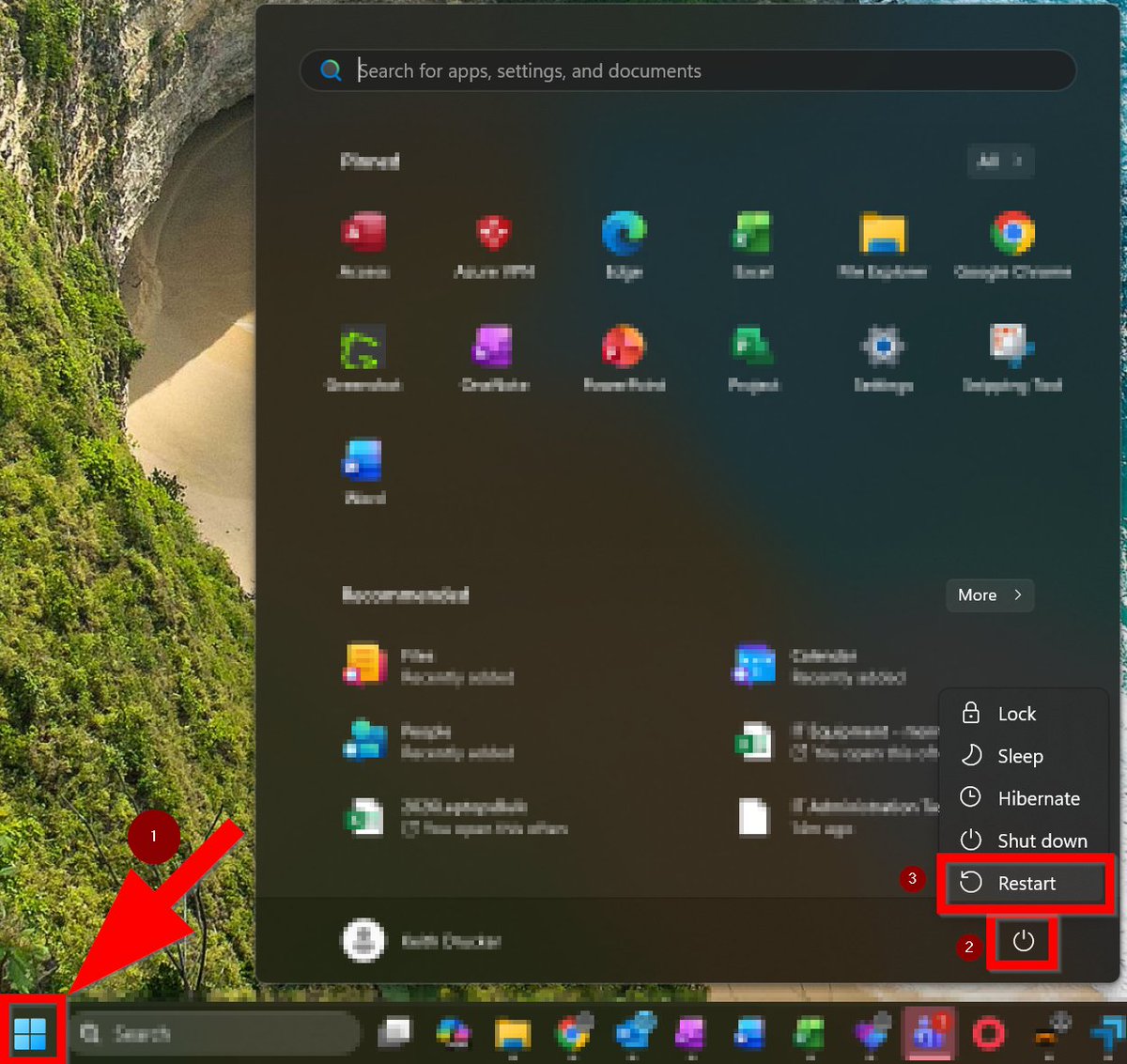
𝐓𝐞𝐜𝐡 𝐓𝐢𝐩: Restart your computer at the end of the day 𝐏𝐮𝐫𝐩𝐨𝐬𝐞: Restarting can clear temporary issues, resolve issues with printing, Wifi and other types of services 𝐈𝐧𝐬𝐭𝐫𝐮𝐜𝐭𝐢𝐨𝐧𝐬: Press Windows key > Click the power button > Select Restart
𝐓𝐞𝐜𝐡 𝐓𝐢𝐩: Take a screenshot of anything on your computer 𝐏𝐮𝐫𝐩𝐨𝐬𝐞: Capture and share any form of information on your computer 𝐈𝐧𝐬𝐭𝐫𝐮𝐜𝐭𝐢𝐨𝐧𝐬: Press print screen

𝐓𝐞𝐜𝐡 𝐓𝐢𝐩: Copy and paste URLs, files, text and more 𝐏𝐮𝐫𝐩𝐨𝐬𝐞: Quickly and accurately transfer different types of information and data 𝐈𝐧𝐬𝐭𝐫𝐮𝐜𝐭𝐢𝐨𝐧𝐬: Press Ctrl + C for copy Press Ctrl + V for paste

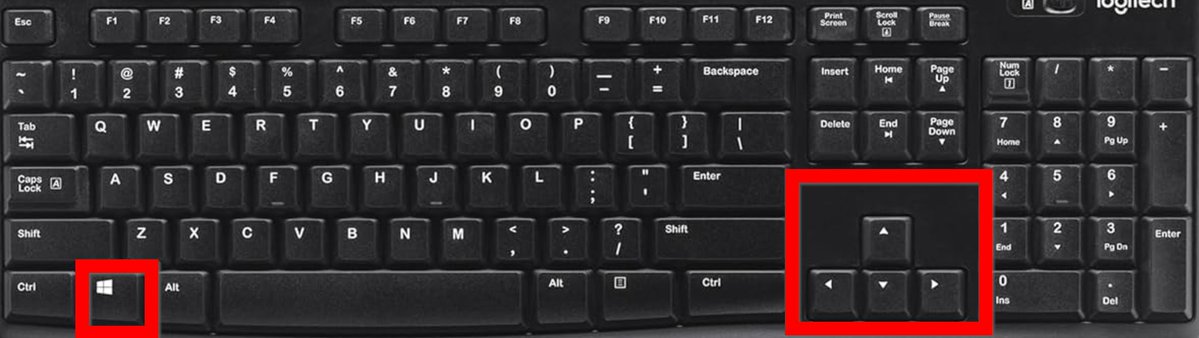
𝐓𝐞𝐜𝐡 𝐓𝐢𝐩: Moving any window or application from a screen to another 𝐏𝐮𝐫𝐩𝐨𝐬𝐞: Organizing your open windows and applications more efficiently or if they are stuck 𝐈𝐧𝐬𝐭𝐫𝐮𝐜𝐭𝐢𝐨𝐧𝐬: Press Windows key + Arrow keys
𝐓𝐞𝐜𝐡 𝐓𝐢𝐩: Reporting an email if it looks suspicious 𝐏𝐮𝐫𝐩𝐨𝐬𝐞: Protecting and preventing the organization from cyber threats 𝐈𝐧𝐬𝐭𝐫𝐮𝐜𝐭𝐢𝐨𝐧𝐬: When selecting an email, click the Report Email button on the right side in ribbon

𝐓𝐞𝐜𝐡 𝐓𝐢𝐩: Change your password on your own if you ever get prompted this type of message 𝐏𝐮𝐫𝐩𝐨𝐬𝐞: Changing your password instantly improving productivity and efficiency 𝐈𝐧𝐬𝐭𝐫𝐮𝐜𝐭𝐢𝐨𝐧𝐬: Ctrl + Alt + Delete and select change password

𝐓𝐞𝐜𝐡 𝐓𝐢𝐩: Using Voice-to-text to speak instead of type 𝐏𝐮𝐫𝐩𝐨𝐬𝐞: Improves efficiency, productivity and is a great way to utilize typing hands-free 𝐈𝐧𝐬𝐭𝐫𝐮𝐜𝐭𝐢𝐨𝐧𝐬: Press Windows key + H

𝐓𝐞𝐜𝐡 𝐓𝐢𝐩: Change your cursor to a color of your preference. 𝐏𝐮𝐫𝐩𝐨𝐬𝐞: Improves visibility, accessibility and provides personal customization. 𝐈𝐧𝐬𝐭𝐫𝐮𝐜𝐭𝐢𝐨𝐧𝐬: Windows + i > Accessibility > Mouse pointer and touch

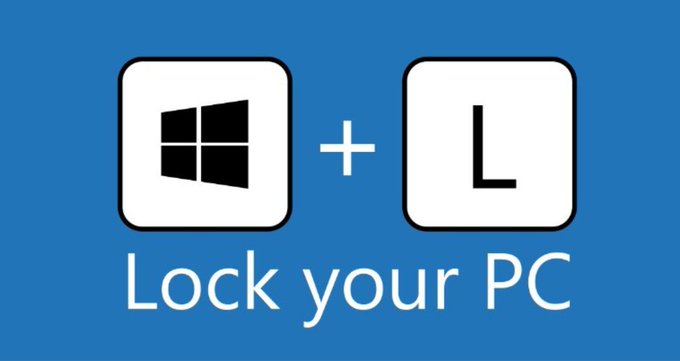
𝐓𝐞𝐜𝐡 𝐓𝐢𝐩: Lock your computer when you step away 𝐏𝐮𝐫𝐩𝐨𝐬𝐞: Locking your computer protects your data and prevents unauthorized access. 𝐈𝐧𝐬𝐭𝐫𝐮𝐜𝐭𝐢𝐨𝐧𝐬: Press Windows Key + L

United States 트렌드
- 1. #heatedrivalry 62K posts
- 2. Good Friday 40.6K posts
- 3. shane 81.6K posts
- 4. Expedition 33 235K posts
- 5. ilya 65.7K posts
- 6. #TheGameAwards 466K posts
- 7. GOTY 76.9K posts
- 8. YOONMIN 24.1K posts
- 9. Bucs 24.9K posts
- 10. Kyle Pitts 20.5K posts
- 11. Mega Man 41.5K posts
- 12. Falcons 39.4K posts
- 13. #TheEndOfAnEra N/A
- 14. Deadpool 39.7K posts
- 15. Todd Bowles 6,205 posts
- 16. Silksong 54.8K posts
- 17. Leon 204K posts
- 18. Geoff 76.2K posts
- 19. jacob tierney 3,213 posts
- 20. Rose 300K posts
Something went wrong.
Something went wrong.