
#androidstudiotasks Suchergebnisse

10 Laptops for Android Studio Programming in 2023 tinyurl.com/bxszhnps #Top10LaptopsForProgrammers #AndroidAppDevelopers #AndroidStudioTasks #AndroidApps #Programming #AI #AINews #AnalyticsInsight #AnalyticsInsightMagazine

Android Studio Gets a Big Gemini 3 Update dlvr.it/TPdlvC


Streamline your development workflow with the newest features in the @AndroidStudio Otter 2 Feature Drop 🦦

🦦 You otter check out the stable Android Studio Otter 2 Feature Drop→ goo.gle/3Kx8pLJ This release supercharges your workflow with Knowledge Base, Gemini 3, and Backup and Sync.
🦦 You otter check out the stable Android Studio Otter 2 Feature Drop→ goo.gle/3Kx8pLJ This release supercharges your workflow with Knowledge Base, Gemini 3, and Backup and Sync.

Google just made automating your thankless work tasks even easier androidauthority.com/google-workspa…


@joedevmob1 Thank you for flagging this. I am a PM on the android studio team. We are actively working on fixing this and should have an update soon. Stay tuned.
#TIL that you can adjust the Task settings in @code. I tweaked the settings so that the tasks listed in the statusbar are the ones that I really need!

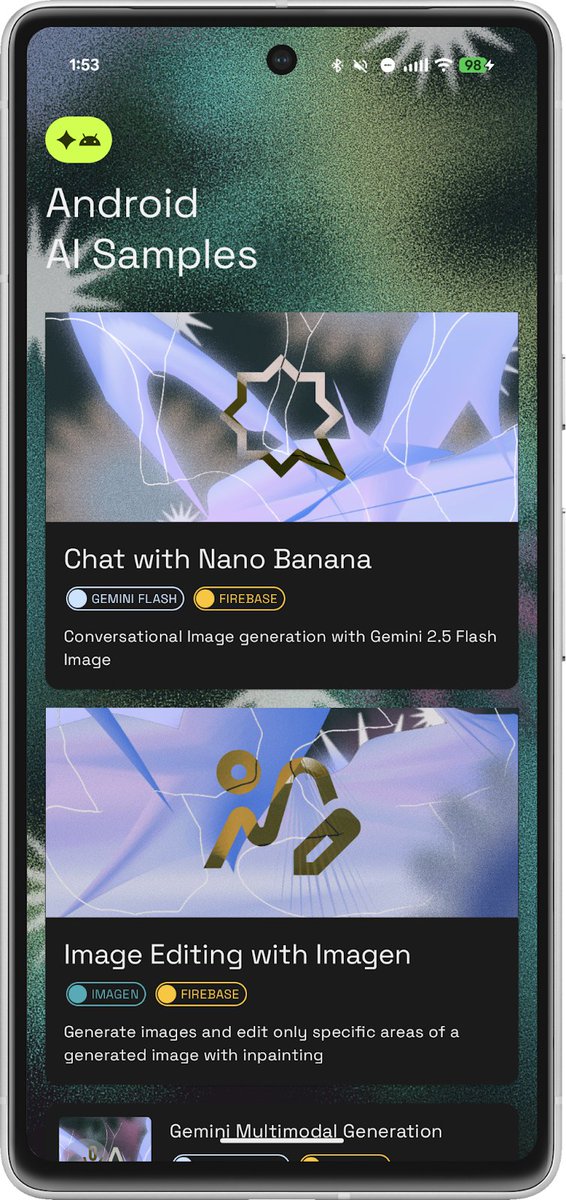
"Learn by doing" is key to Android development 💯 We gave the Android AI Sample Catalog a vibrant new look and a list of copy-paste ready examples. Whether you need on-device power or cloud speed, find your inspiration → goo.gle/4ixO4m7

In android studio When I type a prompt in Agent on Code Assist, it always gives a timeout error. I'm talking about prompts that aren't too complex. How can I fix this? Thanks.
✅ Get early warnings about potential Play policy violations with Play Policy Insights → goo.gle/4npqSHS Now available in Android Studio, this feature shows lint warnings directly in your code to help you build more compliant apps.

TIL: if you cannot see the “Android” option when you click the Projects tooltip in Android studio while building a Nitro module, Gradle probably didn’t sync properly
A clear version control history is essential for a healthy codebase. Gemini in Android Studio for businesses can now propose helpful and informative commit messages for your team automatically, based on the current changes → goo.gle/4n1onf8
![GDGCairo's profile picture. [Google Developer Group - Cairo] we have some interesting technical conferences, competitions, and many other creative activities.](https://pbs.twimg.com/profile_images/1379368180993425411/Azx1VvW9.jpg)
✅ Build custom lint rules tailored to your project ✅ Enforce conventions, structure, and best practices automatically ✅ Catch issues like hardcoded values & inconsistent patterns Turn Android Studio into your automated reviewer — throwing errors your rules define. 🔥
Now, she’s bringing her expertise to Cairo with a session every Android developer needs to see. 🎯 Talk: Make Your Own Android Studio Error!🙌 Wish Android Studio could catch your team’s mistakes before code review? In this session, Qamar will show you how to:

Boostez votre journée de travail avec les widgets de Todoist ! android-mt.ouest-france.fr/news/boostez-v…
adb shell dumpsys activity "your_package_name" developer.android.com/tools/dumpsys

🔧 Mini hack de Android Studio Puedes tener el emulador ocupando toda la altura de la pantalla junto al Logcat. Por fin paz mental 😅 Actívalo en: Settings → Appearance & Behavior → Appearance → Tools Window → ✅ Widescreen tool window layout

10 Laptops for Android Studio Programming in 2023 tinyurl.com/bxszhnps #Top10LaptopsForProgrammers #AndroidAppDevelopers #AndroidStudioTasks #AndroidApps #Programming #AI #AINews #AnalyticsInsight #AnalyticsInsightMagazine
Something went wrong.
Something went wrong.
United States Trends
- 1. FIFA 372K posts
- 2. The WET 117K posts
- 3. FINALLY DID IT 437K posts
- 4. Paraguay 28.2K posts
- 5. Frank Gehry 4,760 posts
- 6. Argentina 231K posts
- 7. Brazil 80.4K posts
- 8. Portugal 105K posts
- 9. Hep B 15.9K posts
- 10. Matt Campbell 11.2K posts
- 11. Warner Bros 249K posts
- 12. Croatia 25.7K posts
- 13. Morocco 67.4K posts
- 14. #Mundial2026 42.2K posts
- 15. Iowa State 9,511 posts
- 16. Sherman 4,695 posts
- 17. Group L 18.2K posts
- 18. Infantino 77.2K posts
- 19. Ghana 85.2K posts
- 20. #USMNT 1,445 posts