
#linuxpermissions risultati di ricerca

Linux Permissions ............... #LinuxPermissions, #LinuxSecurity, #LinuxSysAdmin, #LinuxAdministration, #LinuxSysAdminLife, #LinuxBasics, #LinuxUser, #LinuxUserGroup, #LinuxDirectory, #LinuxFilePermissions
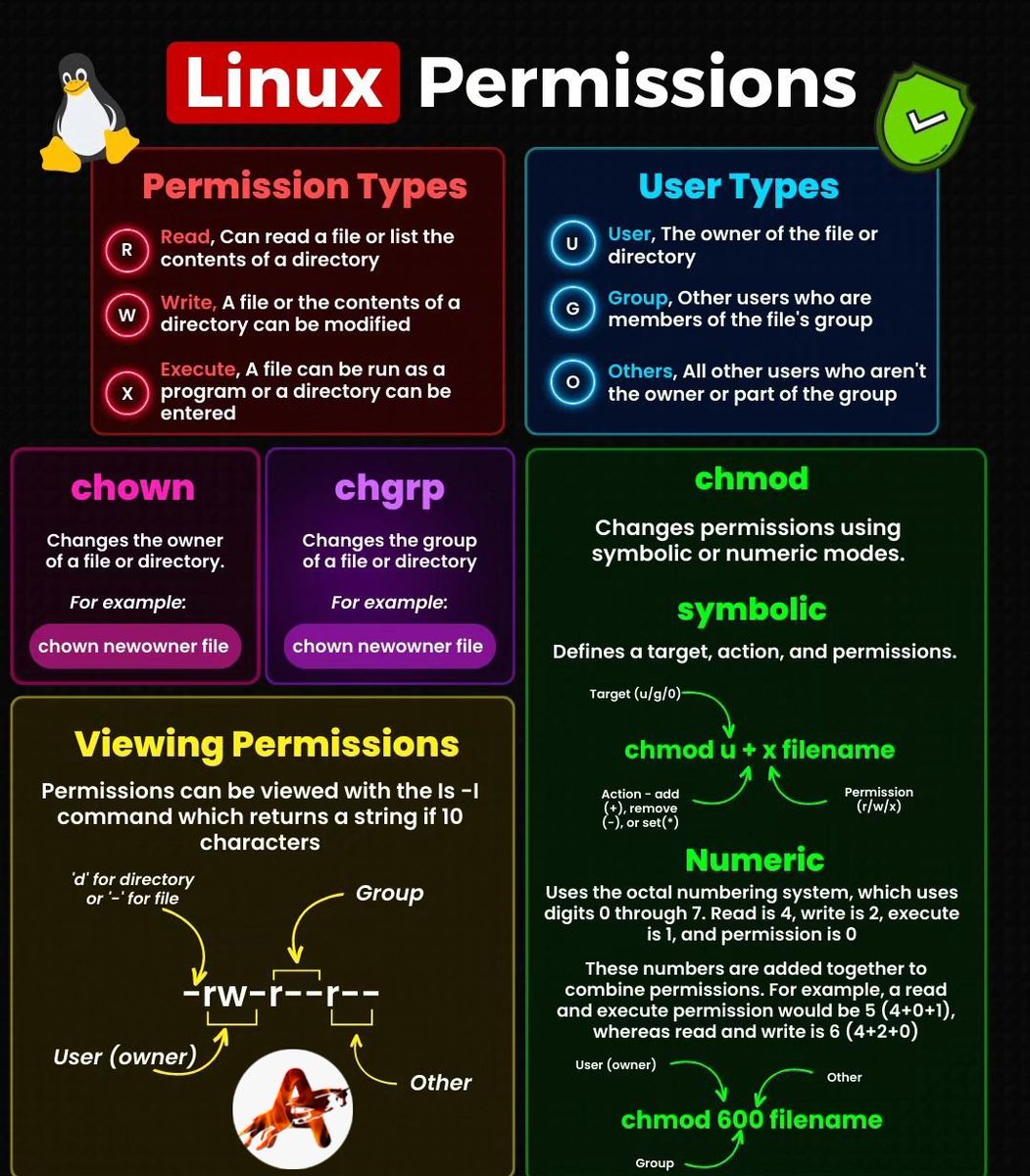

Mastered 20 essential commands to control access, ownership, and execution on files. From chmod to 777, I’m unlocking real CLI power 💥 #30DaysOfCode #LinuxPermissions #CLI #ShellScripting #iiceekiing #DevJourney #scarfacedoteth #blockfuselabs


𝒄𝒉𝒎𝒐𝒅 -𝑹 777 / #𝑻𝒐𝒐 𝑴𝒖𝒄𝒉 𝑭𝒖𝒏 😂😂 🚀 The 𝒄𝒉𝒎𝒐𝒅 command is a command-line utility used in Unix-like operating systems to change the permissions of files and directories. #LinuxPermissions #UnlockTheSecrets #LearningOpportunity #linux #chmod #devops


Mastering #LinuxPermissions is key for managing file access and security! 🛡️🖥️ Learn about different permission types, user types, and essential commands like chmod and chown. #Linux #SysAdmin #TechTips


🐧🔐 Dive into the World of Linux Permissions! Unravel the secrets of controlling access and security on your system. Get ready to empower your Linux journey. 💻🛡️ #LinuxPermissions #CyberSecurity #EmpowerYourLinux


🐧 Mastering Linux Permissions: Unlocking the Power of File and Folder Access Control! coderstool.com/chmod-permissi… #LinuxPermissions #FileAccessControl #LinuxSecurity #PrivacyMatters


I used to have a cheat sheet. It was to skip levels and have unlimited ammo on Tomb Raider, but same thing; opensource.com/sites/default/… #cheatsheet #linux #linuxpermissions #opensource @opensourceway

Day 1 #100DaysOfCode DevOps/Linux Focus: Basics in Bash Learned: Creating files, executing files, listing files in storage, shebang/hashbang basics Next: Variables in Bash #DevOps #LinuxPermissions #ShellScripting


Day 6 of #90DaysOfDevOps: How do you handle file permission issues? chmod, chown, or something else? 🔐🐧 Learned the basics of Linux permissions today! #LinuxPermissions #DevOpsJourney #Day6

File Permissions in Linux chmod, chown, and chgrp buff.ly/40ySi5Y #LinuxPermissions #chmod #chown #chgrp #LinuxAdmin #SystemSecurity #FileManagement #UnixCommands #LinuxTips #TechTutorial #Hostperl

2/10🔍 Understanding Linux UIDs is key for both new and seasoned users. This thread explores SUID (Set User ID), a special file permission in Linux systems. #LinuxPermissions

7/15: Find Files by Permissions 🔐🔍 🔍 Investigate permissions with find /path -type f -perm 644. It's crucial for controlling who can access files. This command searches for files with specific permissions. #LinuxPermissions #DevOpsSecurity
9/10: These advanced permission features provide finer control over file access and security in Linux. Whether it's granting specific permissions to multiple entities or utilizing special permissions, Linux has you covered! #LinuxPermissions
8/10: Finally, we have the 'sticky' bit (t). When applied to a directory, it ensures that only the owner of a file can delete or rename it. To set the sticky bit, use 'chmod +t directory'. #LinuxPermissions
7/10: Another special permission is 'setgid' (s) which allows a user to execute a file with the permissions of the group owner. To set the setgid permission for a directory, use 'chmod g+s directory'. #LinuxPermissions
5/10: Sometimes, we need to grant certain permissions to multiple entities. That's where the 'a' (all) option comes in handy. If we want to allow everyone to read and execute the file, we can use: chmod a+rx example.txt. #LinuxPermissions
4/10: We can change permissions using the chmod command. For instance, to grant execute permission to the owner, we would run: chmod u+x example.txt. Similarly, we can modify permissions for groups ('g') and others ('o'). #LinuxPermissions
2/10: First, we have the basic permission system: read, write, and execute, represented by the letters 'r', 'w', and 'x'. These permissions are assigned to three entities: owner, group, and others. Let's see an example using the ls -l command. #LinuxPermissions
Day 1 #100DaysOfCode DevOps/Linux Focus: Basics in Bash Learned: Creating files, executing files, listing files in storage, shebang/hashbang basics Next: Variables in Bash #DevOps #LinuxPermissions #ShellScripting
Mastered 20 essential commands to control access, ownership, and execution on files. From chmod to 777, I’m unlocking real CLI power 💥 #30DaysOfCode #LinuxPermissions #CLI #ShellScripting #iiceekiing #DevJourney #scarfacedoteth #blockfuselabs
Day 6 of #90DaysOfDevOps: How do you handle file permission issues? chmod, chown, or something else? 🔐🐧 Learned the basics of Linux permissions today! #LinuxPermissions #DevOpsJourney #Day6
7/15: Find Files by Permissions 🔐🔍 🔍 Investigate permissions with find /path -type f -perm 644. It's crucial for controlling who can access files. This command searches for files with specific permissions. #LinuxPermissions #DevOpsSecurity
Mastering #LinuxPermissions is key for managing file access and security! 🛡️🖥️ Learn about different permission types, user types, and essential commands like chmod and chown. #Linux #SysAdmin #TechTips
7/15: Find Files by Permissions 🔐🔍 🔍 Investigate permissions with find /path -type f -perm 644. It's crucial for controlling who can access files. This command searches for files with specific permissions. #LinuxPermissions #DevOpsSecurity
2/10🔍 Understanding Linux UIDs is key for both new and seasoned users. This thread explores SUID (Set User ID), a special file permission in Linux systems. #LinuxPermissions
🐧🔐 Dive into the World of Linux Permissions! Unravel the secrets of controlling access and security on your system. Get ready to empower your Linux journey. 💻🛡️ #LinuxPermissions #CyberSecurity #EmpowerYourLinux
Linux Permissions ............... #LinuxPermissions, #LinuxSecurity, #LinuxSysAdmin, #LinuxAdministration, #LinuxSysAdminLife, #LinuxBasics, #LinuxUser, #LinuxUserGroup, #LinuxDirectory, #LinuxFilePermissions
🐧 Mastering Linux Permissions: Unlocking the Power of File and Folder Access Control! coderstool.com/chmod-permissi… #LinuxPermissions #FileAccessControl #LinuxSecurity #PrivacyMatters
𝒄𝒉𝒎𝒐𝒅 -𝑹 777 / #𝑻𝒐𝒐 𝑴𝒖𝒄𝒉 𝑭𝒖𝒏 😂😂 🚀 The 𝒄𝒉𝒎𝒐𝒅 command is a command-line utility used in Unix-like operating systems to change the permissions of files and directories. #LinuxPermissions #UnlockTheSecrets #LearningOpportunity #linux #chmod #devops
9/10: These advanced permission features provide finer control over file access and security in Linux. Whether it's granting specific permissions to multiple entities or utilizing special permissions, Linux has you covered! #LinuxPermissions
8/10: Finally, we have the 'sticky' bit (t). When applied to a directory, it ensures that only the owner of a file can delete or rename it. To set the sticky bit, use 'chmod +t directory'. #LinuxPermissions
7/10: Another special permission is 'setgid' (s) which allows a user to execute a file with the permissions of the group owner. To set the setgid permission for a directory, use 'chmod g+s directory'. #LinuxPermissions
5/10: Sometimes, we need to grant certain permissions to multiple entities. That's where the 'a' (all) option comes in handy. If we want to allow everyone to read and execute the file, we can use: chmod a+rx example.txt. #LinuxPermissions
4/10: We can change permissions using the chmod command. For instance, to grant execute permission to the owner, we would run: chmod u+x example.txt. Similarly, we can modify permissions for groups ('g') and others ('o'). #LinuxPermissions
2/10: First, we have the basic permission system: read, write, and execute, represented by the letters 'r', 'w', and 'x'. These permissions are assigned to three entities: owner, group, and others. Let's see an example using the ls -l command. #LinuxPermissions
1/10: Hey everyone! Let's talk about advanced permission management in Linux. 🚀 As you know, Linux is known for its robust security features, and permissions play a vital role in controlling access to files & directories. Let's dive in & explore some examples! #LinuxPermissions
Linux Permissions ............... #LinuxPermissions, #LinuxSecurity, #LinuxSysAdmin, #LinuxAdministration, #LinuxSysAdminLife, #LinuxBasics, #LinuxUser, #LinuxUserGroup, #LinuxDirectory, #LinuxFilePermissions
🐧 Mastering Linux Permissions: Unlocking the Power of File and Folder Access Control! coderstool.com/chmod-permissi… #LinuxPermissions #FileAccessControl #LinuxSecurity #PrivacyMatters
I used to have a cheat sheet. It was to skip levels and have unlimited ammo on Tomb Raider, but same thing; opensource.com/sites/default/… #cheatsheet #linux #linuxpermissions #opensource @opensourceway
𝒄𝒉𝒎𝒐𝒅 -𝑹 777 / #𝑻𝒐𝒐 𝑴𝒖𝒄𝒉 𝑭𝒖𝒏 😂😂 🚀 The 𝒄𝒉𝒎𝒐𝒅 command is a command-line utility used in Unix-like operating systems to change the permissions of files and directories. #LinuxPermissions #UnlockTheSecrets #LearningOpportunity #linux #chmod #devops
Mastered 20 essential commands to control access, ownership, and execution on files. From chmod to 777, I’m unlocking real CLI power 💥 #30DaysOfCode #LinuxPermissions #CLI #ShellScripting #iiceekiing #DevJourney #scarfacedoteth #blockfuselabs
🐧🔐 Dive into the World of Linux Permissions! Unravel the secrets of controlling access and security on your system. Get ready to empower your Linux journey. 💻🛡️ #LinuxPermissions #CyberSecurity #EmpowerYourLinux
Mastering #LinuxPermissions is key for managing file access and security! 🛡️🖥️ Learn about different permission types, user types, and essential commands like chmod and chown. #Linux #SysAdmin #TechTips
Something went wrong.
Something went wrong.
United States Trends
- 1. FIFA 364K posts
- 2. The WET 117K posts
- 3. FINALLY DID IT 437K posts
- 4. Paraguay 27.8K posts
- 5. Brazil 79K posts
- 6. Argentina 228K posts
- 7. Frank Gehry 4,516 posts
- 8. Portugal 105K posts
- 9. Hep B 1,790 posts
- 10. Matt Campbell 11.1K posts
- 11. Warner Bros 247K posts
- 12. Morocco 66.6K posts
- 13. Croatia 25.5K posts
- 14. Iowa State 9,394 posts
- 15. #Mundial2026 41.5K posts
- 16. Group L 18K posts
- 17. Infantino 75.8K posts
- 18. #USMNT 1,444 posts
- 19. Sherman 4,623 posts
- 20. Ghana 84K posts