
#perfectitmasterclass search results

To get #PerfectIt to replace "Ms." with "Ms", you can add the following check. If you get false positives, you could use a wildcard instead to flag it only if the next work begins with a capital letter. #PerfectItMasterclass

How to add suffix rules in @IntelligentEdit's #PerfectIt: Example to add a hyphen for the suffix "like": Wildcards Find: (<[A-Za-z][a-z]@)(like>) Replace: $1-$2 Instructions: Except for "archetype", "prototype", "subtype", "genotype", "phenotype" [etc.] #PerfectItMasterclass
Why use wildcards in PerfectIt? To flag: - Patterns - Grammatical constructions - Acronyms that are also words* - Multiple forms of a word simultaneously - Strings with symbols - Strings that are not whole words - Words only at the start of a para. #PerfectItMasterclass
Find out which new Chicago rules have been incorporated into PerfectIt 6 and find out what you can learn from the Chicago stylesheet and what you can apply differently in your own stylesheets. youtube.com/watch?v=7X4ddL… #PerfectIt #PerfectItMasterclass

youtube.com
YouTube
CMOS 17th and 18th eds. in PerfectIt 5 and 6
If you want PerfectIt to flag dates like "01 May" and "07 August" so you can remove the zero, you could use this: <0([0-9][^s ][JFMASOND] But you'll get some false positives, like the one in the image. In the #PerfectItMasterclass I'll show you how to reduce false positives.
![anglopremier's tweet image. If you want PerfectIt to flag dates like "01 May" and "07 August" so you can remove the zero, you could use this:
&lt;0([0-9][^s ][JFMASOND]
But you'll get some false positives, like the one in the image. In the #PerfectItMasterclass I'll show you how to reduce false positives.](https://pbs.twimg.com/media/GXOQn4QXoAAno_3.png)
My review of the latest version of PerfectIt. #PerfectIt #PerfectItMasterclass youtube.com/watch?v=M3Yxbz…

youtube.com
YouTube
PerfectIt 6 review
I've added a video to my blog post about bringing @intelligentedit's @ChicagoManual style sheet for PerfectIt in line with the 18th edition and how to add some rules that were never included in the PerfectIt style sheet. Includes techniques I'll present in #PerfectItMasterclass.
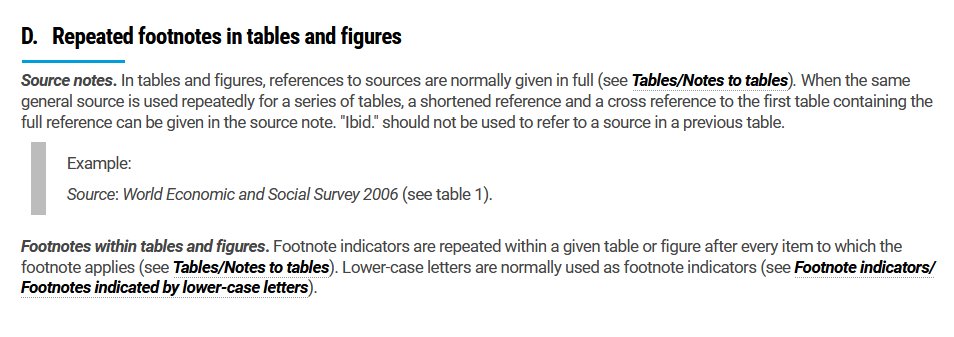
This is one of the instructions in the UN Editorial Manual. Did you know that @IntelligentEdit's PerfectIt can check for failure to apply this rule, even if the two tables are many pages apart? It just take a bit of lateral thinking. #PerfectItMasterclass epekho.magistrad.com/trainerDetails…
One of my favourite solutions. Simply adding these words to the Italics list in @PerfectIt would give false positives, but you can eliminate almost all false positives with a simple trick that I'll show you during my #PerfectItMasterclass. More info at: epekho.magistrad.com/trainerDetails…
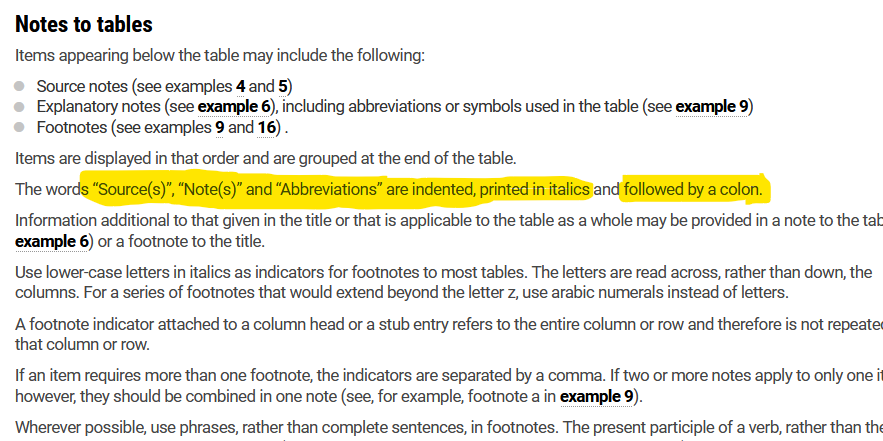
5: How would you apply these two rules in PerfectIt without generating false positives? In other words, how do you get it to flag "source" written in roman at the start of a paragraph but not in the middle of sentence? I'll explain how in my upcoming #PerfectItMasterclass.
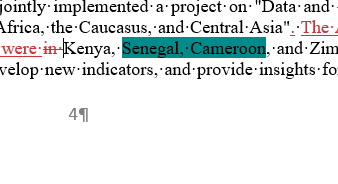
My #AdvancedWord4Editors workshop will include a tool to flag any two countries that do not appear in alphabetical order in a text. In my #PerfectItMasterclass I'll also provide a stylesheet to flag countries in the wrong order. Find out more at epekho.magistrad.com/trainerDetails….
PerfectIt might not be designed for languages other than English, but you can build a stylesheet for other languages on top of the foreign-language template I'll provide during my #PerfectItMasterclass. With Wildcards, you can even create rules for inflected languages. E.g.:
I just discovered a workaround to get #PerfectIt to flag all numbered/lettered lists. Useful if your client only allows bulleted lists. If there's enough interest (10 likes or retweets), I'll show you how! #PerfectItMasterclass
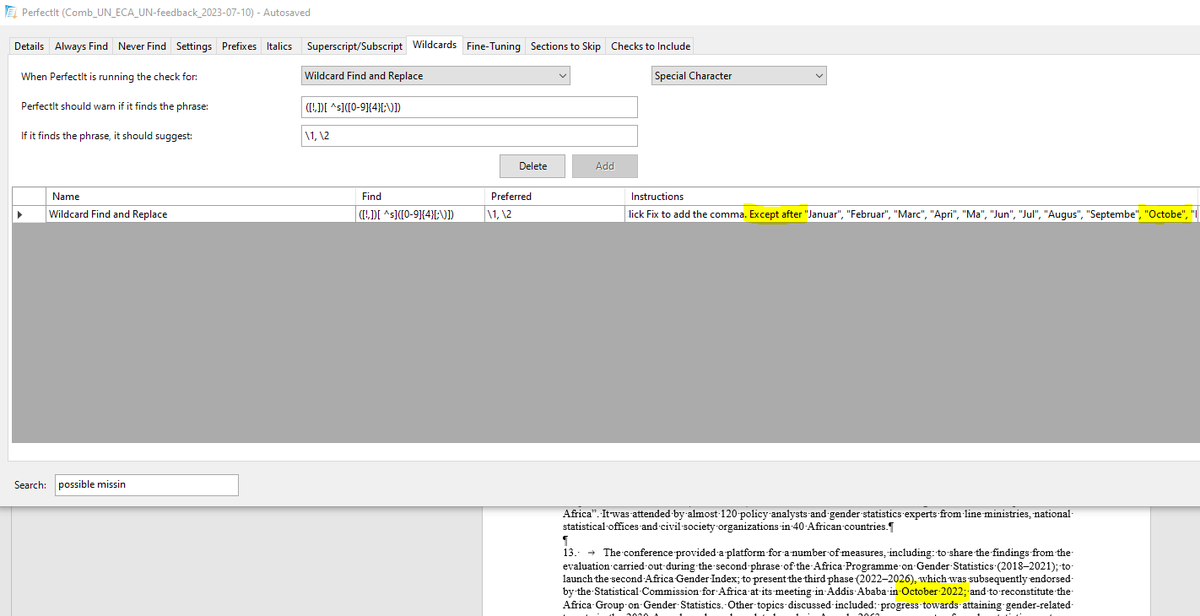
PerfectIt users might think I made a mistake by omitting the final letter of each month below, but it's deliberate. Find out why at my #PerfectItMasterclass. Also attend if you've never used "Except after" rules! Sign up at epekho.magistrad.com/catalogItemDet…
By using: <([Dd]igi)[tal]{1,2}i[sz]([esdingato]{1,5})> You'll flag: digitize digitizes digitized digitizing digitization digitalize digitalizes digitalized digitalizing digitalization And all the same words with -s- spellings. #PerfectItMasterclass: epekho.magistrad.com/trainerDetails…
You probably know by now that Turkey is now officially called Türkiye. In my #PerfectItMasterclass, I'll explain why you shouldn't add a "Preferred spelling" to flag "Turkey" in your text and why you should use wildcards instead. epekho.magistrad.com/trainerDetails…
My institutional clients now use "Türkiye". I've just added 2 wildcard rules to PerfectIt: 1 to detect "Turkey", "Türkey", "Turkiye". 1 to detect "TURKEY", "TÜRKEY", "TURKIYE", "TÜRKIYE"*. Find out how at #PerfectItMasterclass, and why you shouldn't use Preferred spelling.
You can use AI to generate a list of the exceptions (though use common sense, since it often includes words that are compounds). Replace "like" with any other suffix. Learn more about advanced PerfectIt rules at the #PerfectItMasterclass. See epekho.magistrad.com/trainerDetails…
Okay, when I said "new year" I didn't mean 2025. But that's just because I've spent the last two years improving it further. So much so that there are two separate masterclasses. Sign up for #PerfectItMasterclass and #AdvancedWord4Editors at epekho.magistrad.com/trainerDetails….
PerfectIt wildcard challenge! (@intelligentedit) My text: "continue providing". My client: "We prefer "continue+infinitive" over "continue+gerund". Create a wildcard rule to flag all such instances of "continue+gerund". I'll reveal my solution in a few days. #PerfectItMasterclass
Great to see @Magistrad_Plus among the @METMeetings/#METM24 sponsors. Looking forward to teaching my courses on their platform next year. See epekho.magistrad.com/trainerDetails… for more information. #AdvancedWord4Editors #PerfectItMasterclass
For one of my clients, I have to carefully check all instances of digitize and digitalize and all derivatives and variations. Without wildcards you'd need 20 PerfectIt checks; with wildcards, one is enough. Learn how to perform checks like the one below at #PerfectItMasterclass.
Why use wildcards in PerfectIt? To flag: - Patterns - Grammatical constructions - Acronyms that are also words* - Multiple forms of a word simultaneously - Strings with symbols - Strings that are not whole words - Words only at the start of a para. #PerfectItMasterclass
PerfectIt might not be designed for languages other than English, but you can build a stylesheet for other languages on top of the foreign-language template I'll provide during my #PerfectItMasterclass. With Wildcards, you can even create rules for inflected languages. E.g.:
I just discovered a workaround to get #PerfectIt to flag all numbered/lettered lists. Useful if your client only allows bulleted lists. If there's enough interest (10 likes or retweets), I'll show you how! #PerfectItMasterclass
You can use AI to generate a list of the exceptions (though use common sense, since it often includes words that are compounds). Replace "like" with any other suffix. Learn more about advanced PerfectIt rules at the #PerfectItMasterclass. See epekho.magistrad.com/trainerDetails…
How to add suffix rules in @IntelligentEdit's #PerfectIt: Example to add a hyphen for the suffix "like": Wildcards Find: (<[A-Za-z][a-z]@)(like>) Replace: $1-$2 Instructions: Except for "archetype", "prototype", "subtype", "genotype", "phenotype" [etc.] #PerfectItMasterclass
To get #PerfectIt to replace "Ms." with "Ms", you can add the following check. If you get false positives, you could use a wildcard instead to flag it only if the next work begins with a capital letter. #PerfectItMasterclass
Find out which new Chicago rules have been incorporated into PerfectIt 6 and find out what you can learn from the Chicago stylesheet and what you can apply differently in your own stylesheets. youtube.com/watch?v=7X4ddL… #PerfectIt #PerfectItMasterclass
youtube.com
YouTube
CMOS 17th and 18th eds. in PerfectIt 5 and 6
My review of the latest version of PerfectIt. #PerfectIt #PerfectItMasterclass youtube.com/watch?v=M3Yxbz…
youtube.com
YouTube
PerfectIt 6 review
Great to see @Magistrad_Plus among the @METMeetings/#METM24 sponsors. Looking forward to teaching my courses on their platform next year. See epekho.magistrad.com/trainerDetails… for more information. #AdvancedWord4Editors #PerfectItMasterclass
PerfectIt wildcard challenge! (@intelligentedit) My text: "continue providing". My client: "We prefer "continue+infinitive" over "continue+gerund". Create a wildcard rule to flag all such instances of "continue+gerund". I'll reveal my solution in a few days. #PerfectItMasterclass
This is one of the instructions in the UN Editorial Manual. Did you know that @IntelligentEdit's PerfectIt can check for failure to apply this rule, even if the two tables are many pages apart? It just take a bit of lateral thinking. #PerfectItMasterclass epekho.magistrad.com/trainerDetails…
My #AdvancedWord4Editors workshop will include a tool to flag any two countries that do not appear in alphabetical order in a text. In my #PerfectItMasterclass I'll also provide a stylesheet to flag countries in the wrong order. Find out more at epekho.magistrad.com/trainerDetails….
If you want PerfectIt to flag dates like "01 May" and "07 August" so you can remove the zero, you could use this: <0([0-9][^s ][JFMASOND] But you'll get some false positives, like the one in the image. In the #PerfectItMasterclass I'll show you how to reduce false positives.
By using: <([Dd]igi)[tal]{1,2}i[sz]([esdingato]{1,5})> You'll flag: digitize digitizes digitized digitizing digitization digitalize digitalizes digitalized digitalizing digitalization And all the same words with -s- spellings. #PerfectItMasterclass: epekho.magistrad.com/trainerDetails…
For one of my clients, I have to carefully check all instances of digitize and digitalize and all derivatives and variations. Without wildcards you'd need 20 PerfectIt checks; with wildcards, one is enough. Learn how to perform checks like the one below at #PerfectItMasterclass.
PerfectIt users might think I made a mistake by omitting the final letter of each month below, but it's deliberate. Find out why at my #PerfectItMasterclass. Also attend if you've never used "Except after" rules! Sign up at epekho.magistrad.com/catalogItemDet…
You probably know by now that Turkey is now officially called Türkiye. In my #PerfectItMasterclass, I'll explain why you shouldn't add a "Preferred spelling" to flag "Turkey" in your text and why you should use wildcards instead. epekho.magistrad.com/trainerDetails…
My institutional clients now use "Türkiye". I've just added 2 wildcard rules to PerfectIt: 1 to detect "Turkey", "Türkey", "Turkiye". 1 to detect "TURKEY", "TÜRKEY", "TURKIYE", "TÜRKIYE"*. Find out how at #PerfectItMasterclass, and why you shouldn't use Preferred spelling.
I've added a video to my blog post about bringing @intelligentedit's @ChicagoManual style sheet for PerfectIt in line with the 18th edition and how to add some rules that were never included in the PerfectIt style sheet. Includes techniques I'll present in #PerfectItMasterclass.
One of my favourite solutions. Simply adding these words to the Italics list in @PerfectIt would give false positives, but you can eliminate almost all false positives with a simple trick that I'll show you during my #PerfectItMasterclass. More info at: epekho.magistrad.com/trainerDetails…
5: How would you apply these two rules in PerfectIt without generating false positives? In other words, how do you get it to flag "source" written in roman at the start of a paragraph but not in the middle of sentence? I'll explain how in my upcoming #PerfectItMasterclass.
Okay, when I said "new year" I didn't mean 2025. But that's just because I've spent the last two years improving it further. So much so that there are two separate masterclasses. Sign up for #PerfectItMasterclass and #AdvancedWord4Editors at epekho.magistrad.com/trainerDetails….
6: My #PerfectItMasterClass includes a section on "the trouble with ctrl+A". Example: you select all, set the language, but your footnotes and comments still have the wrong language. I'll explain more in the session, but you can also download a fix from anglopremier.com/blog/
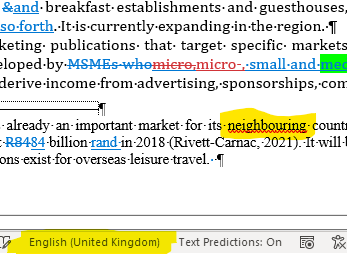
If you want PerfectIt to flag dates like "01 May" and "07 August" so you can remove the zero, you could use this: <0([0-9][^s ][JFMASOND] But you'll get some false positives, like the one in the image. In the #PerfectItMasterclass I'll show you how to reduce false positives.
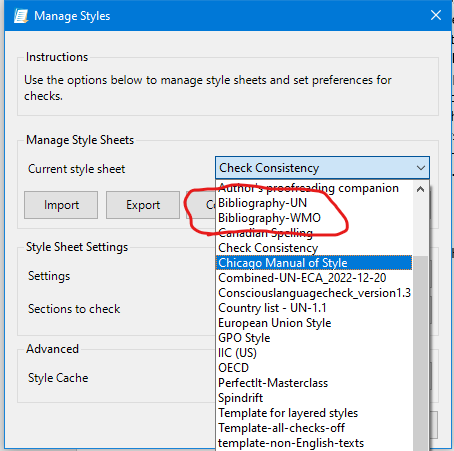
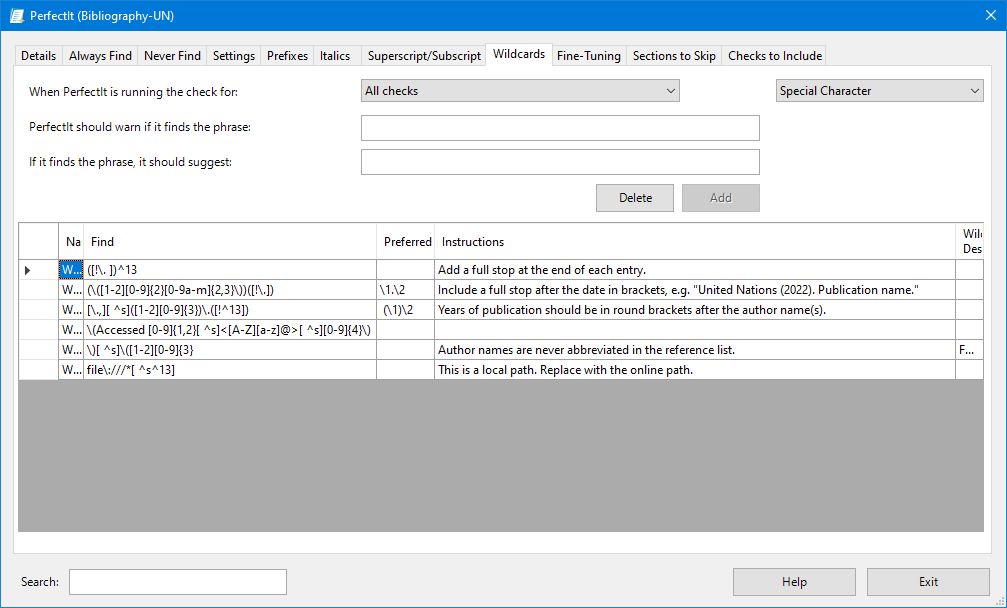
In the recent wildcards demo by @IntelligentEdit, James Harbeck gave examples for changing bibliography entries. I recently began creating a separate bibliography sheet for each client. When I spot an issue, I add a rule that would detect it in future. #PerfectItMasterclass
My #AdvancedWord4Editors workshop will include a tool to flag any two countries that do not appear in alphabetical order in a text. In my #PerfectItMasterclass I'll also provide a stylesheet to flag countries in the wrong order. Find out more at epekho.magistrad.com/trainerDetails….
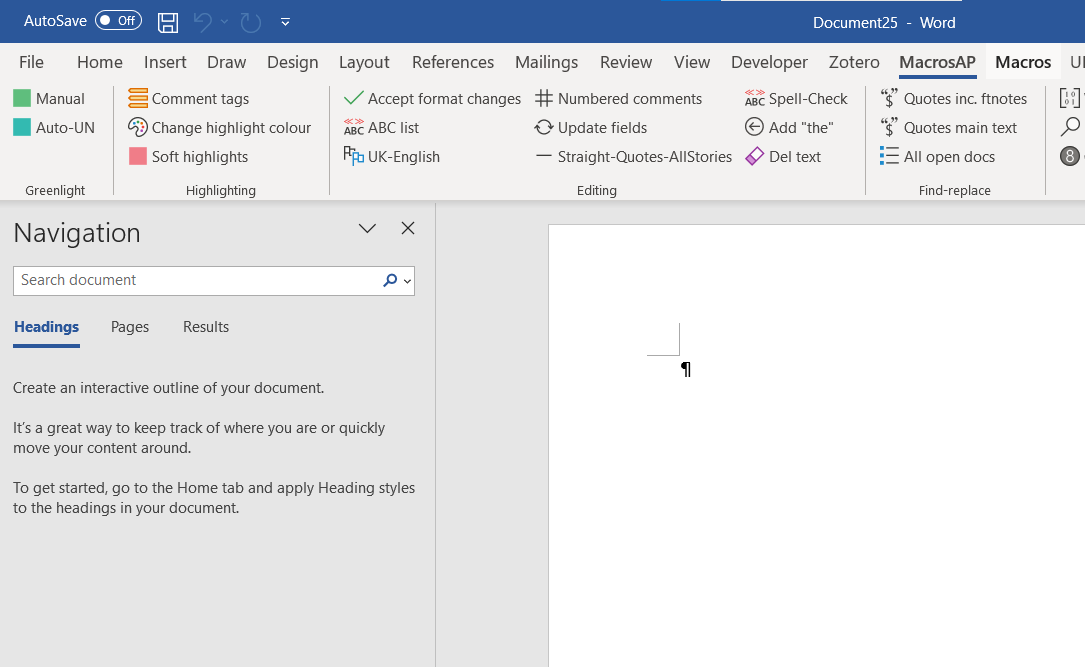
One of the things that's been delaying the announcement of my #PerfectItMasterclass and #AdvancedWord4Editors series is that I was struggling to incorporate my macro buttons into a template. I finally figured it out, so those attending will get these buttons to run the macros.

This is one of the instructions in the UN Editorial Manual. Did you know that @IntelligentEdit's PerfectIt can check for failure to apply this rule, even if the two tables are many pages apart? It just take a bit of lateral thinking. #PerfectItMasterclass epekho.magistrad.com/trainerDetails…
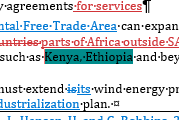
Without my tool, which I'll share in my #PerfectItMasterclass (though the tool doesn't require PerfectIt), would I have spotted that these countries are not written in alphabetical order, as required by my client? Perhaps, but perhaps not. Thanks to my tool, I can't miss it.
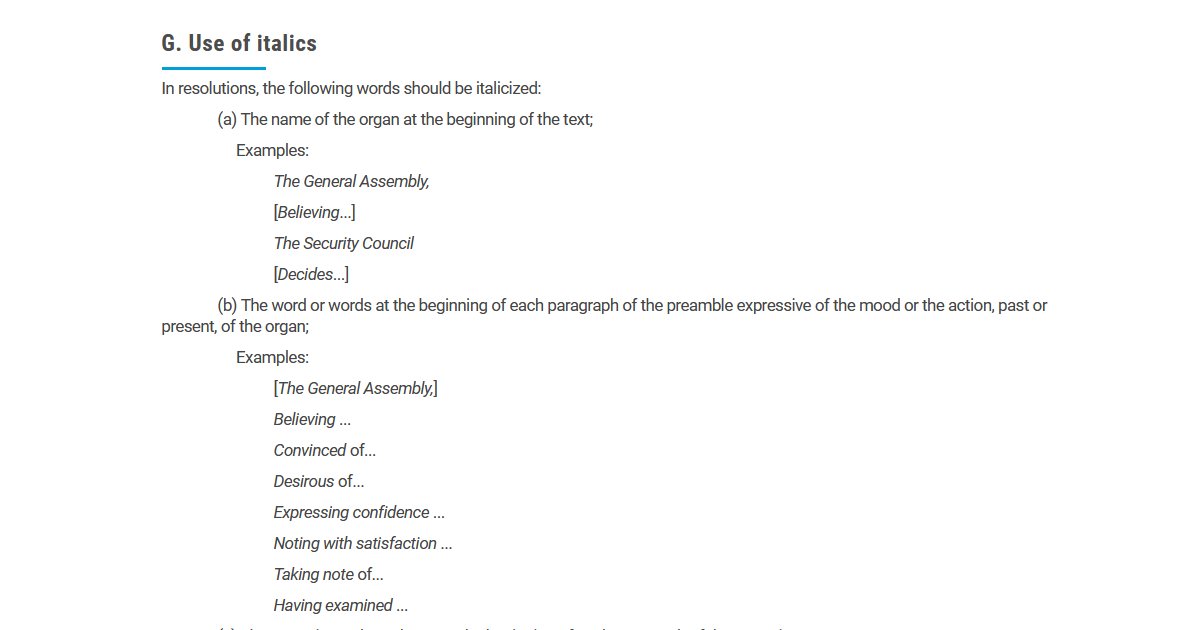
UN style requires these at the start of a paragraph in the preamble to be italicized. How can you get PerfectIt to flag "Believing" if it's at the start of the paragraph and in roman, but not flagged if it's mid-sentence? Find out how at my #PerfectItMasterclass. #AMediting
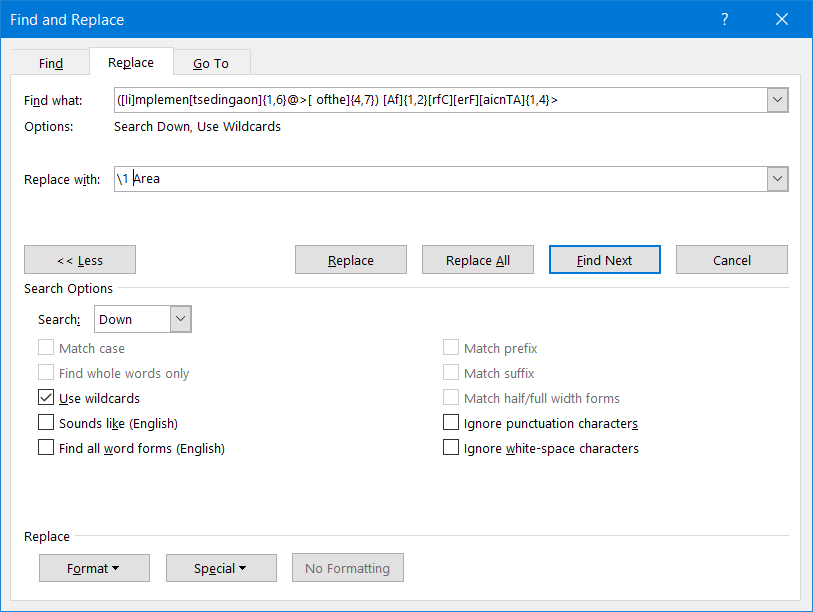
Just added this rule to PerfectIt. Believe it or not, it's very useful for the texts I work on. #PerfectItMasterclass
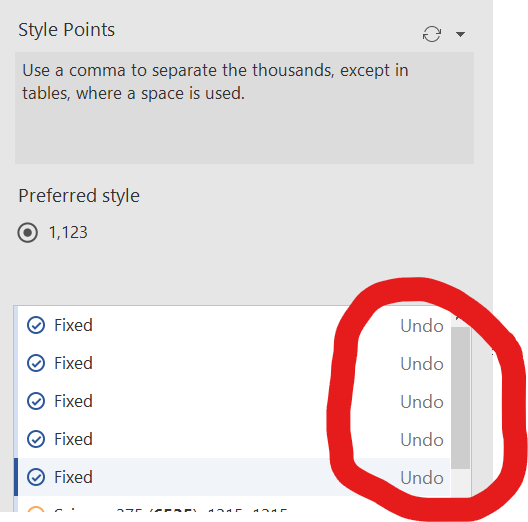
1 - Did you know that it might be a bad idea to use the PerfectIt undo button? Find out why in my PerfectIt/Word masterclass, to be announced soon. #PerfectItMasterClass
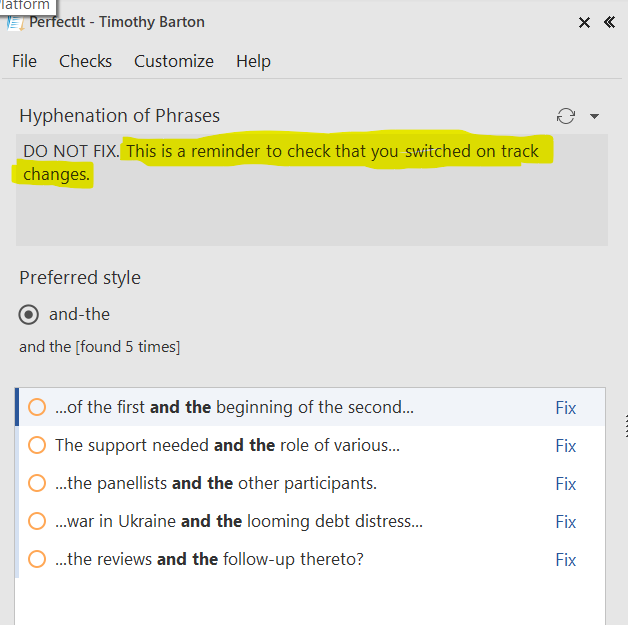
As it's nearly Xmas, here's a freebie tip from my #PerfectItMasterclass. If you're supposed to work with track changes on, set a hyphenation rule requiring "and-the". Almost any document has "and the" in it, so you trigger this reminder to switch on track changes. #xl8 #editing
5: How would you apply these two rules in PerfectIt without generating false positives? In other words, how do you get it to flag "source" written in roman at the start of a paragraph but not in the middle of sentence? I'll explain how in my upcoming #PerfectItMasterclass.
To get #PerfectIt to replace "Ms." with "Ms", you can add the following check. If you get false positives, you could use a wildcard instead to flag it only if the next work begins with a capital letter. #PerfectItMasterclass
PerfectIt users might think I made a mistake by omitting the final letter of each month below, but it's deliberate. Find out why at my #PerfectItMasterclass. Also attend if you've never used "Except after" rules! Sign up at epekho.magistrad.com/catalogItemDet…
What am I doing tweeting at 2am? I've finally cracked how to share my macro buttons with the #PerfectItMasterclass #AdvancedWord4Editors (incl. translators) participants without your own customized buttons being overwritten. Hoping to announce some dates very soon.
Great to see @Magistrad_Plus among the @METMeetings/#METM24 sponsors. Looking forward to teaching my courses on their platform next year. See epekho.magistrad.com/trainerDetails… for more information. #AdvancedWord4Editors #PerfectItMasterclass
Something went wrong.
Something went wrong.
United States Trends
- 1. No Kings N/A
- 2. #USMNT N/A
- 3. Sonny Gray N/A
- 4. #ENGENES_MADE_ENHYPEN_7 N/A
- 5. Belgium N/A
- 6. Aaron Nola N/A
- 7. Tim Ream N/A
- 8. Matt Turner N/A
- 9. #UFCSeattle N/A
- 10. Sal Stewart N/A
- 11. #STLCards N/A
- 12. Doku N/A
- 13. Pulisic N/A
- 14. Nick Nolte N/A
- 15. JJ Wetherholt N/A
- 16. Myles Bailey N/A
- 17. Roldan N/A
- 18. CB Bucknor N/A
- 19. Weah N/A
- 20. Stanek N/A