
#powershelltip 搜尋結果

Did you know the #PowerShell split method has a 'MaxSubString' parameter? If you specify .split('.',2) it'll split the string at the first two . and then stop #PowerShellTip


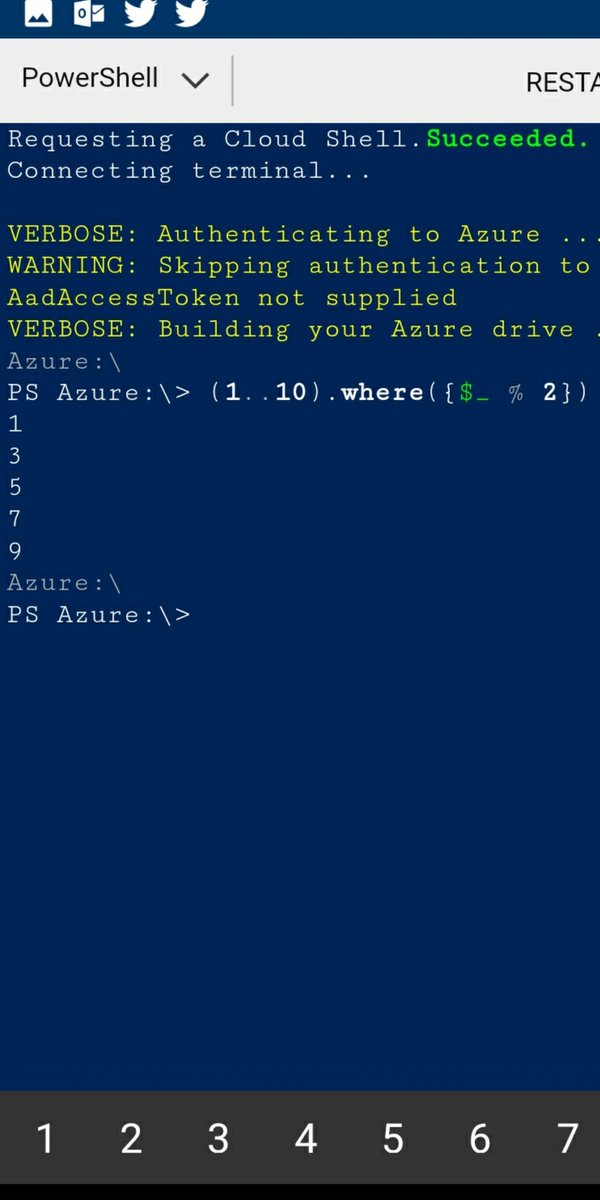
#PowerShellTip to zoom in ISE or VS Code by sendkeys class and sendwaitmethod() ^ is 'CTRL' and {ADD} is '+' Zoom by 5% 😉
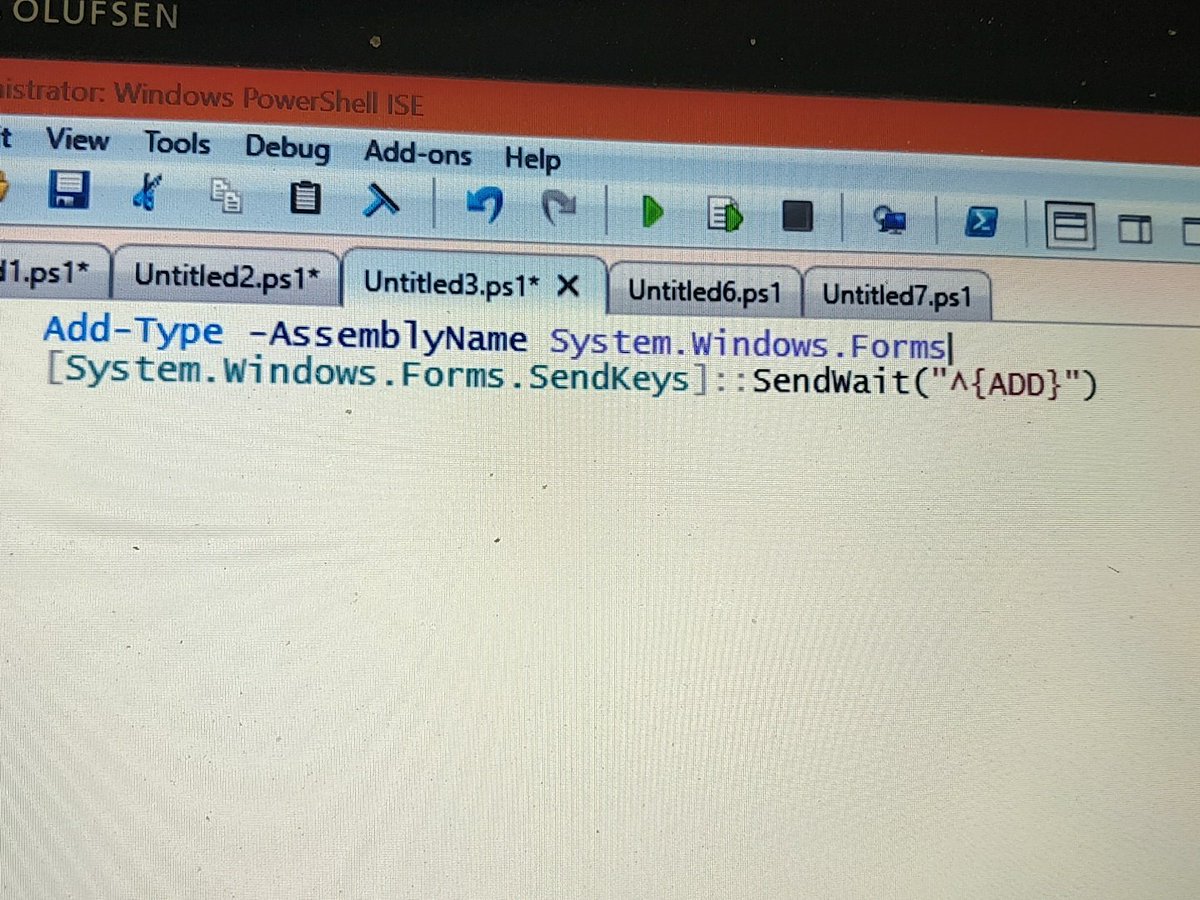

Did you know that you can assign multiple variables via the Split operator (and string method)? #PowerShell #PowerShellTip

----------#PowerShell Tip #2---------- Get-Help automatically adds the wildcard characters behind the scenes. In the example, the (*) wildcard characters are not required and omitting them produces the same result. #PowerShellTip #girlswhocode #100DaysOfCode #azure #Microsoft


Make your code editor window the same size as your normal column length to discourage long lines. #PowerShellTip

![ChendrayanV's tweet image. #PowerShellTip to find methods overload definitions [math]::abs](https://pbs.twimg.com/media/DSyyss5VAAErs6F.jpg)

If you are using PowerShell as your terminal in VSCode, you can pipe any output or variable to 'New-EditorFile'. 😎#powershelltip


#PowerShellTip: To change your prompt, use the following syntax: function prompt { 'Test: ' + (Get-Location) + '> '} You can then retrieve the contents of the function with the following: Get-Content function:\prompt

#PowerShellTip to render HTML on browser using #Polaris module! Working on own middleware template.... Try it yourself! github.com/PowerShell/Pol…


#PowerShellTip #PowerShell one liner Get previous month last date ([DateTime]::Today.AddDays(- ([datetime]::Today.Day))).ToLongDateString()
![ChendrayanV's tweet image. #PowerShellTip #PowerShell one liner
Get previous month last date
([DateTime]::Today.AddDays(- ([datetime]::Today.Day))).ToLongDateString()](https://pbs.twimg.com/media/EOaM-87U4AArrGO.jpg)

@orzelc: If you access that reference sys via Windows, this should help: blogs.technet.com/b/heyscripting… #powershelltip

#Powershelltip: Need to track or review what you do in powershell? Use Start-Transcript to log to a file. http://bit.ly/9jfz9c
TIL that you can label your loops in PowerShell and then control which one you break out of by referencing the label. That's pretty neat! #PowerShellTip e.g. github.com/jpomfret/Adven…

#PowerShellTip: Uncover the mystery! When deobfuscating PowerShell, peek into the scope with Get-Variable -Scope <YourScope> and unveil variables with Get-Variable -Name YourPattern*. 🔍💻 #InfoSecInsights #PowerShellDeobfuscation #cybersecuritytips

#sqltip #powershelltip #dostip #checkport powershell tnc <hostname> -port <num> e.g. tnc winpc1 -port445 "WARNING: TCP Connect to winpc1:445 failed"

#PowerShellTip: if you want to open the current directory you're in in file explorer, type "ii ."

Did you know that you can assign multiple variables via the Split operator (and string method)? #PowerShell #PowerShellTip
Make your code editor window the same size as your normal column length to discourage long lines. #PowerShellTip
#PowerShellTip to zoom in ISE or VS Code by sendkeys class and sendwaitmethod() ^ is 'CTRL' and {ADD} is '+' Zoom by 5% 😉
If you are using PowerShell as your terminal in VSCode, you can pipe any output or variable to 'New-EditorFile'. 😎#powershelltip
Did you know the #PowerShell split method has a 'MaxSubString' parameter? If you specify .split('.',2) it'll split the string at the first two . and then stop #PowerShellTip
----------#PowerShell Tip #2---------- Get-Help automatically adds the wildcard characters behind the scenes. In the example, the (*) wildcard characters are not required and omitting them produces the same result. #PowerShellTip #girlswhocode #100DaysOfCode #azure #Microsoft
#PowerShellTip to render HTML on browser using #Polaris module! Working on own middleware template.... Try it yourself! github.com/PowerShell/Pol…
#PowerShellTip #PowerShell one liner Get previous month last date ([DateTime]::Today.AddDays(- ([datetime]::Today.Day))).ToLongDateString()
#PowerShellTip: To change your prompt, use the following syntax: function prompt { 'Test: ' + (Get-Location) + '> '} You can then retrieve the contents of the function with the following: Get-Content function:\prompt
Something went wrong.
Something went wrong.
United States Trends
- 1. #AEWDynamite 18.8K posts
- 2. Giannis 76.2K posts
- 3. #Survivor49 2,420 posts
- 4. Claudio 28.2K posts
- 5. #TheChallenge41 1,821 posts
- 6. Jamal Murray 4,918 posts
- 7. Kevin Overton N/A
- 8. Ryan Nembhard 2,976 posts
- 9. #SistasOnBET 1,893 posts
- 10. Will Wade N/A
- 11. #iubb 1,182 posts
- 12. Achilles 5,082 posts
- 13. Kevin Knight 1,936 posts
- 14. Bucks 50.5K posts
- 15. Tyler Herro 1,642 posts
- 16. Steve Cropper 4,421 posts
- 17. Dark Order 1,675 posts
- 18. Yeremi N/A
- 19. Jericho Sims N/A
- 20. Wiggins 4,616 posts