
#pythoninexcel 검색 결과

🐍 Mac users, this one's for you. Editable initialization for Python in Excel is now live. Set your imports, preload libraries, and tailor your environment. Details: msft.it/6012tnyje #PythoninExcel #MicrosoftExcel #ExcelforMac

🐍 Python in Excel update: Editable initialization is now available on Mac as well as Windows. Customize your imports, preload libraries, and streamline your setup. 🔗 msft.it/6015tT6MB #PythoninExcel #MicrosoftExcel #ExcelforMac


You can now run Python directly in Excel — no setup, no add-ins! Type your Python code right in the formula bar & see instant results. To watch click 👉youtu.be/ZC9nnO5-2FQ #PythonInExcel #ExcelTips #Microsoft365 #DataScience #Productivity #ExcelUpdate #Automation

youtube.com
YouTube
How to Use Python in Excel (New Formula Bar Feature) | Step-by-Step...
⚡ICYMI in October: Python in Excel for Windows now supports editable initialization. Set up your environment your way with custom imports and defaults. msft.it/6012tHCF8 🐍 #PythoninExcel #MicrosoftExcel

🐍 ICYMI: Python in Excel is now more flexible than ever. Edit default initialization so every workbook starts your way. Get the specs in our blog. msft.it/6012sfXze #PythoninExcel #MicrosoftExcel
📊 Editable initialization is live for Python in Excel for Windows. View and edit code, add your own imports, and save changes that travel with your workbook. 🐍 msft.it/6011sLWnL #PythoninExcel #MicrosoftExcel
📊 Python in Excel just got more flexible with editable initialization. Whether you're a data scientist, analyst, or developer, this unlocks a new level of productivity in your Python workflows. msft.it/6012sahEs #MicrosoftExcel #PythoninExcel

By @UsamaJawad96 - For developers utilizing Python in Excel, Microsoft has introduced a new feature that should improve productivity. #Microsoft #PythonInExcel neowin.net/news/programme…

🐍 Big news for Python in Excel users! You can now edit the default initialization, allowing you to tailor imports, defaults, and configurations to fit your workflow. Get the specs in our new blog. msft.it/6011sadgt #MicrosoftExcel #PythoninExcel

Day 26: Copilot + Python 🤖 Ask. Analyze. Automate. Excel just became a thinking partner AND an analytics engine. #ExcelAt40 #Copilot #PythonInExcel




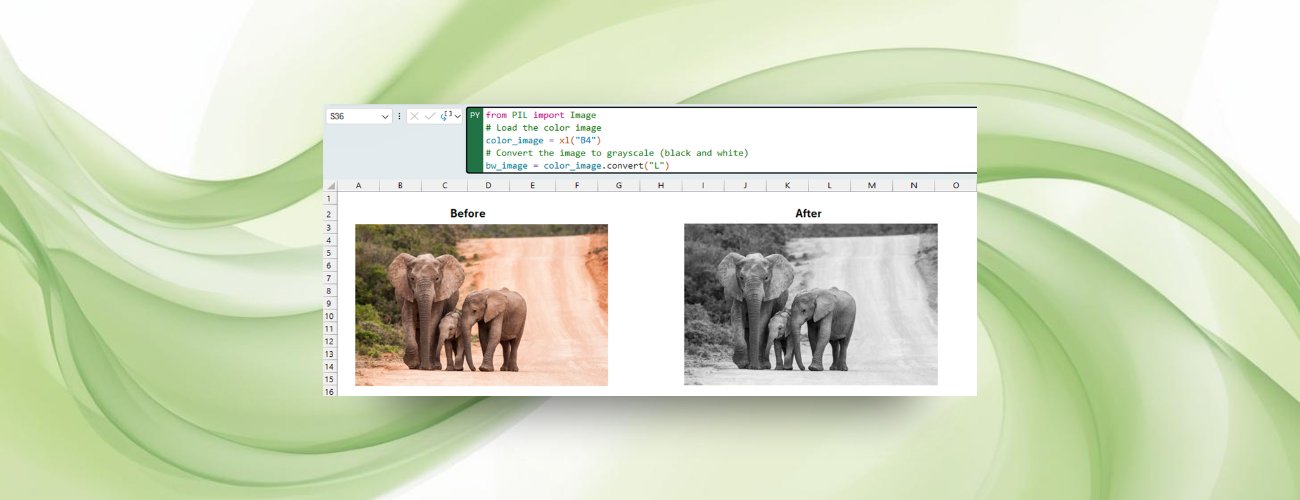
📸🐍 Tried image analysis in Excel with Python yet? Whether you want to check image quality, extract metadata, or adjust colors, it all happens without leaving your workbook. msft.it/6019scJMH #PythoninExcel

Predict Sales in Excel with Python + ChatGPT Excel formulas are great, but sometimes Python + AI makes it easier. Join My Data Academy :-www.excelsirji.com #ExcelTips #PythonInExcel #ChatGPT #ExcelAI #DataAnalysis #SalesForecast #Excel #Python #ChatGPT #AI #ArtificialIntelligence
🖼️ Turn Excel into your image lab! Now you can drop an image into a cell and use Python to analyze or edit it. Learn how in our new blog. msft.it/6015sro7V #PythoninExcel #MicrosoftExcel #Microsoft365
Excel Day 3 of 40: From 4M cells to 17B Swipe through the evolution of the world’s most iconic spreadsheet. It’s now a programmable, AI-powered canvas. #ExcelAt40 #SpreadsheetGlowUp #PythonInExcel #MicrosoftExcel


🖼️ Excel just leveled up! You can now drag and drop images into cells for some Python-powered editing magic. Who knew spreadsheets could double as your personal image lab? 📊✨ #PythonInExcel #ExcelMagic #WindowsForum windowsforum.com/threads/python…
📸🐍 You can now analyze image data in Excel using Python. Check if they're blurry or sharp, extract metadata, and even more without leaving your spreadsheet. Learn how in our new blog. msft.it/6011sRVr3 #PythoninExcel #MicrosoftExcel

After @turnleafan, @CountryRisk_io is now the 2nd data provider (that I know of) to make their data feed available through xlwings Lite! More power to Excel users! 🔥 🚀 👉 countryrisk.io/blog/countryda… #xlwings #pythoninexcel #python #microsoftexcel

Something went wrong.
Something went wrong.
United States Trends
- 1. $MAYHEM 1,986 posts
- 2. Villa 181K posts
- 3. #MeAndTheeSeriesEP4 1.68M posts
- 4. Xavi 10.2K posts
- 5. GAME DAY 31.1K posts
- 6. namjoon 169K posts
- 7. Arteta 32.7K posts
- 8. The EU 457K posts
- 9. Good Saturday 34.2K posts
- 10. Saliba 13.2K posts
- 11. Unai Emery 16.2K posts
- 12. #Caturday 3,574 posts
- 13. #AVLARS 14K posts
- 14. Alfredo Díaz 6,093 posts
- 15. Odegaard 13K posts
- 16. #COYS 1,599 posts
- 17. Championship Saturday 5,064 posts
- 18. #SaturdayVibes 4,061 posts
- 19. Gyokeres 15.9K posts
- 20. Southern Miss N/A