
#vscodetip hasil pencarian


#VSCodeTip: You can customize @code's window title to be as descriptive or concise as you want with the window.title setting, mine shows the whole folder's path: "window.title": "${rootPath}${separator}${activeEditorName}${separator}${appName}"

#VSCodeTip: Using the @code CLI is often faster than opening folders manually: `code .` : Open the current folder in a new window `code -r .` : Open the current folder in the current window `code -a .` : Add the current folder to the current window
#vscodetip - reduce distractions while you’re #coding? You can do that in @code with ZenMode. github.com/Microsoft/vsco…
#vscodetip - want to change your file icon themes? Easily preview the changes using @code’s command palette. github.com/Microsoft/vsco…
#VSCodeTip: Ctrl/Cmd+Shift+L will expand the selection to the current word and then select all occurrences of that word. This is a very fast way of doing a find and replace within the active file.
#vscodetip - not sure what @code extension to install? Search by recommended extensions. github.com/Microsoft/vsco…
#VSCodeTip: Use Ctrl+Shift+O (Cmd+Shift+O on macOS) in @code to navigate between symbols in the current file. It's a faster and more reliable way to navigate between definitions than regular text search.
#vscodetip - want to see what @code can do for your productivity? Check out the interactive playground Help->Welcome github.com/Microsoft/vsco…

#VSCodeTip: Open a file through @code's quick pick (Ctrl/Cmd+P) in a new editor group with Ctrl+Enter
#VSCodeTip: You can show multiple rulers in the @code editor using the `editor.rulers` setting, if you don't like the theme's ruler color you can even override it. I use `"editor.rulers": [ 80, 100, 120 ]` personally to help with various codebases I work in.
![Tyriar's tweet image. #VSCodeTip: You can show multiple rulers in the @code editor using the `editor.rulers` setting, if you don't like the theme's ruler color you can even override it.
I use `"editor.rulers": [ 80, 100, 120 ]` personally to help with various codebases I work in.](https://pbs.twimg.com/media/Dhql10nUwAMrW5s.jpg)
#VSCodeTip: Ctrl/cmd+d in @code selects the "current find match" which expands the selection to the current word. Pressing it again will add the next match to the selection. This is great for quickly selecting a word or words in close proximity.
#vscodetip - want different keybindings in @code? You can customize your own! github.com/Microsoft/vsco…
#VSCodeTip: In @code's find in files, quickly navigate to the first search result and focus the editor with F4. Press it again to go to the next result and use Shift+F4 to go to the previous result.
#vscodetip - want additional functionality in @code? Install 1+ of over 1500 extensions to add more features. github.com/Microsoft/vsco…
#vscodetip - cool programmers use font ligatures. You can do that in @code. github.com/Microsoft/vsco…

#vscodetip - what the? @code is the best markdown editor. See a live preview to the side (and it syncs as you click) github.com/Microsoft/vsco…


#vscodetip - what extensions should you install for @code? Try the recommend extensions feature. github.com/Microsoft/vsco…


🔥 4 VS Code Extensions Every Developer Should Have 1️⃣ Prettier – Clean, consistent code formatting 2️⃣ ESLint – Catch errors before they break your app 3️⃣ GitLens – Supercharged Git insights 4️⃣ Thunder Client – Fast & lightweight API testing



I've just published VSCode ectension Copy to. Copy file or directory to anywere on VSCode😊 marketplace.visualstudio.com/items?itemName…


𝟑. 𝐓𝐨𝐨𝐥𝐬 𝐭𝐨 𝐁𝐨𝐨𝐬𝐭 𝐘𝐨𝐮𝐫 𝐂𝐨𝐝𝐢𝐧𝐠 VS Code Extensions Pack → lnkd.in/gfWDhYBN codesandbox.io stackblitz.com figma.com (UI/UX)


One of my favourite overlooked #VisualStudio features is using the editor status bar to change Spaces to Tabs. Can also change CRLF <-> LF, and file encoding too.


Java tip: Use var for cleaner code when the type is obvious. #Java #CodeTips #Developer


Previously on thatJeffSmith: Definitive guide to moving from SQL Developer to VS Code thatjeffsmith.com/archive/2024/1…

I see that there is already an issue in Github, so I have added these screenshots there: github.com/microsoft/vsco…


New tip on shortips.dev => Improve Code Documentation with Overloading functions in TypeScript What is ? - 1 technical tip a day (front, back, ui, devops, infra, AI..) - Less than 3 minutes Ultimate goal? - Build TikTok for Devs Brought to you…

📌 CodeVisualizer is a powerful VS Code extension that provides two main visualization capabilities: function-level flowcharts for understanding code control flow, and codebase-level dependency graphs for analy... 🔗 github.com/DucPhamNgoc08/… #TypeScript

Typescript Tip Don't hide null or undefined inside type aliases. Keep your unions clean - add nullability where it's actually used, not inside the alias itself.


Alright looks like this should do it as a note about documentation - the VS Code docs I found refer to tool sets, and to tools and different sort of notation for it like #edit vs edit/edit_file or similar which is oddly confusing.

New tip on shortips.dev => Don't Use Class to Type Object in TypeScript What is ? - 1 technical tip a day (front, back, ui, devops, infra, AI..) - Less than 3 minutes Ultimate goal? - Build TikTok for Devs Brought to you by…

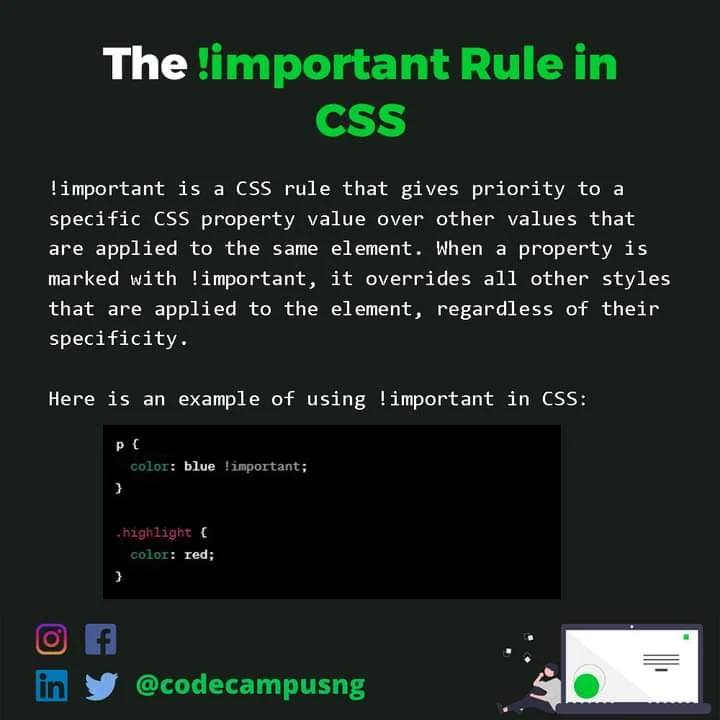
Want to learn more programming concepts and tips.? Follow @codecampusng for more Understanding the !Important Rule in CSS Begin your journey as a Developer today. Click the Link in Bio #vscode #sourcecode #programming #javascript #js #framework #internet #programmers #web

omg 😭 I found out about "editor.pasteAs.enabled" setting in cursor / vscode , I feel like someone should have told me this before

Okay, we are closing out the week with a fix in the VS Code extension for #Arc. This fix addresses an issue where, when you rotated a token and the tip box gave you the option to copy, it wasn't actually copying the token. Fixed. Update to 0.21. marketplace.visualstudio.com/items?itemName…
#vscodetip - want to change your file icon themes? Easily preview the changes using @code’s command palette. github.com/Microsoft/vsco…
#VSCodeTip: You can customize @code's window title to be as descriptive or concise as you want with the window.title setting, mine shows the whole folder's path: "window.title": "${rootPath}${separator}${activeEditorName}${separator}${appName}"
#VSCodeTip: Using the @code CLI is often faster than opening folders manually: `code .` : Open the current folder in a new window `code -r .` : Open the current folder in the current window `code -a .` : Add the current folder to the current window
#vscodetip - reduce distractions while you’re #coding? You can do that in @code with ZenMode. github.com/Microsoft/vsco…
#VSCodeTip: Ctrl/Cmd+Shift+L will expand the selection to the current word and then select all occurrences of that word. This is a very fast way of doing a find and replace within the active file.
#VSCodeTip: Use Ctrl+Shift+O (Cmd+Shift+O on macOS) in @code to navigate between symbols in the current file. It's a faster and more reliable way to navigate between definitions than regular text search.
#VSCodeTip: Open a file through @code's quick pick (Ctrl/Cmd+P) in a new editor group with Ctrl+Enter
#vscodetip - want to see what @code can do for your productivity? Check out the interactive playground Help->Welcome github.com/Microsoft/vsco…
#vscodetip - not sure what @code extension to install? Search by recommended extensions. github.com/Microsoft/vsco…
#vscodetip in @code change your file icon theme by typing “file icon” in the command palette. More tips - github.com/Microsoft/vsco…
#vscodetip - want different keybindings in @code? You can customize your own! github.com/Microsoft/vsco…
#VSCodeTip: You can show multiple rulers in the @code editor using the `editor.rulers` setting, if you don't like the theme's ruler color you can even override it. I use `"editor.rulers": [ 80, 100, 120 ]` personally to help with various codebases I work in.
#VSCodeTip: In @code's find in files, quickly navigate to the first search result and focus the editor with F4. Press it again to go to the next result and use Shift+F4 to go to the previous result.
#VSCodeTip: Ctrl/cmd+d in @code selects the "current find match" which expands the selection to the current word. Pressing it again will add the next match to the selection. This is great for quickly selecting a word or words in close proximity.
#vscodetip change to a new theme by typing theme in the command palette. More tips - github.com/Microsoft/vsco…

#vscodetip - reduce distractions while you’re #coding? You can do that in @code with ZenMode by @waderyan_ msft.social/Fifxd8

#vscodetip - cool programmers use font ligatures. You can do that in @code. github.com/Microsoft/vsco…
Something went wrong.
Something went wrong.
United States Trends
- 1. Cloudflare 31.2K posts
- 2. #heatedrivalry 30.2K posts
- 3. Cowboys 73.9K posts
- 4. Happy Farmers 1,944 posts
- 5. LeBron 114K posts
- 6. Warner Bros 32.3K posts
- 7. fnaf 2 27.8K posts
- 8. Wizkid 179K posts
- 9. Lions 93.3K posts
- 10. Pickens 15.2K posts
- 11. rUSD N/A
- 12. Shang Tsung 35.9K posts
- 13. scott hunter 6,804 posts
- 14. Paramount 21.9K posts
- 15. Gibbs 21K posts
- 16. #PowerForce N/A
- 17. Jake Tapper 44K posts
- 18. Davido 99.1K posts
- 19. Hiroyuki Tagawa 31.7K posts
- 20. Scott and Kip 3,932 posts