
#linux_tips kết quả tìm kiếm


Are you Missing the "Untitled Document" on right click on Ubuntu 18.04/18.10, re enable it again by typing this in the Terminal: touch ~/Templates/Untitled\ Document Peace! #linux #linux_tips


On Ubuntu, to show the git branch on your terminal, add the following line to your .bashrc: PS1="${debian_chroot:+($debian_chroot)}\[\033[01;32m\]\u@\h\[\033[00m\]:\[\033[01;34m\]\w\[\033[00m\]\[\e[91m\]\$(__git_ps1 ' [%s]')\[\e[00m\]\$ " #Linux_Tips 🐧
![MohammadAliEN's tweet image. On Ubuntu, to show the git branch on your terminal, add the following line to your .bashrc:
PS1="${debian_chroot:+($debian_chroot)}\[\033[01;32m\]\u@\h\[\033[00m\]:\[\033[01;34m\]\w\[\033[00m\]\[\e[91m\]\$(__git_ps1 ' [%s]')\[\e[00m\]\$ "
#Linux_Tips 🐧](https://pbs.twimg.com/media/FR6LccAX0AEVsLv.jpg)
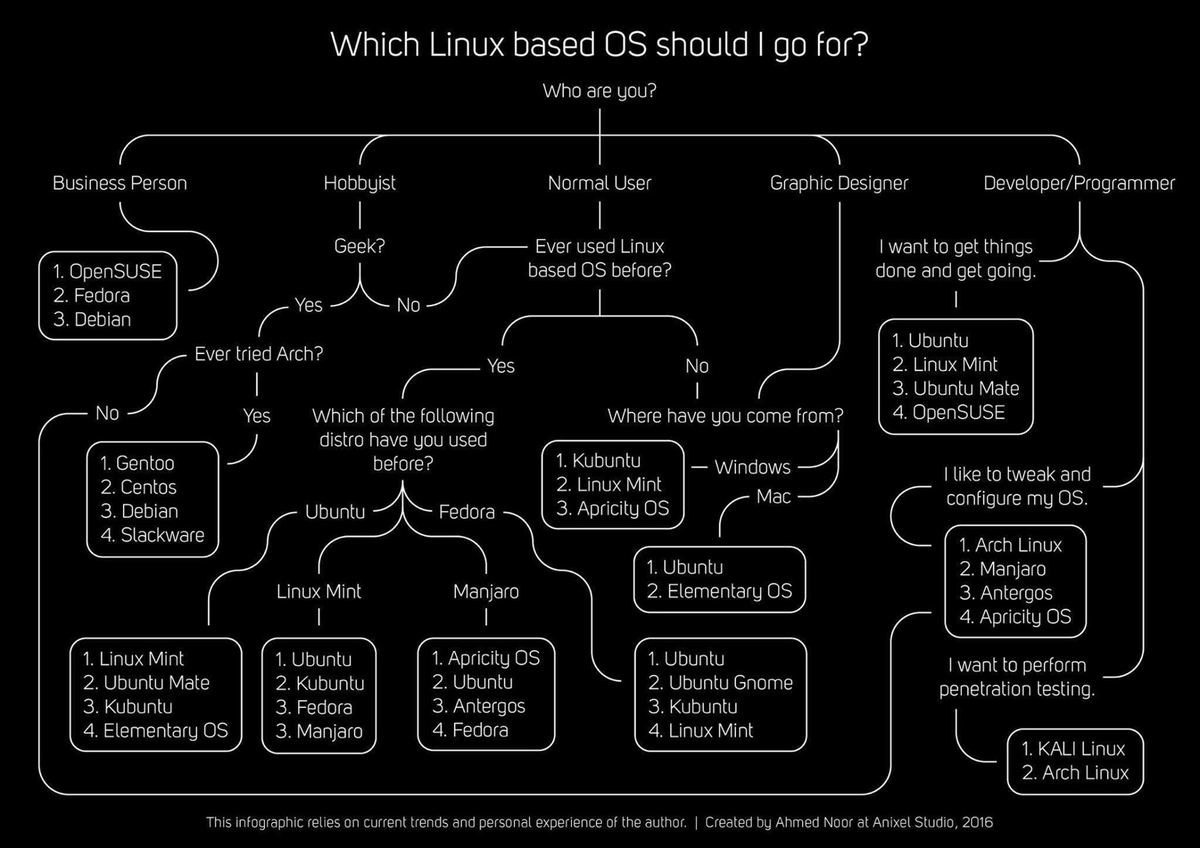
Interesting Infographic #linux_tips #linux_howto #linux For a daily driver, I suggest using Linux distros like Pop!_OS, Linux Mint, Fedora. What’s your current Linux distro and have you stopped distro hopping yet? cc: @thelinuxEXP@mastodon.social, @jay@learnlinux.social

linux :su 切换其他用户执行命令:su username -c 'sh smt.sh' username为非root用户。 #linux_tips

linux 连接状态:netstat -n | awk '/^tcp/ {++S[$NF]} END {for(a in S) print a, S[a]}' #linux_tips

Before using aliasing on Linux. Please use `type command` to verify for availability of the word. Imagine nice and last are command😊 @alx_africa @julienbarbier42 #linux_tips.

amazing linux tips for the day: i. $ du -h _max-depth=1 directory-name/ : spits out human readable disk usage of that dir. 🫤 ii. $ > filename : file is empty now 💨 iii. $ <space> command : won't be recorded in ~/.bash_history 🕵️♀️ #linux_tips

to print a memory map for a running process, this will show you how much memory is being used by the process and any library modules that it uses. In beautiful way. Use: $ pmap To show processes for current shell use : $ pmap $$ #Linux #sysadmin #Linux_tips

We have two types of path 1) Absolute path, 2)Relative path 1) Absolute path : It start with root directory (/) and follows the tree branch untill path of desired directory or file completed. Ex. cd /home/me/practice #Linux_commands #Linux_tips #linuxBasics #learnlinux #linux

Move a running process to a new screen shell monkeypatch.me/blog/move-a-ru… #linux_tips #screen
The Automatic Bug Reporting Tool, - ABRT, detect and report app crashes # yum install abrt-desktop # systemctl start abrtd.service To check $ sleep 100 & [1] xxxxxxx. $ kill -s SIGSEGV xxxxxx Replace xx in kill command with xxx value #Linux #Linux_tips #SysAdmin
Move files to another directory which are older than a date serverfault.com/questions/5059… #linux_tips

APT Command in Linux [A to Z Guide] linoxide.com/linux-command/… #LINUX_COMMANDS #Linux_tips #linux
How to Add a Samba User in Linux linoxide.com/netwrk/how-to-… #Linux_tips #network #Samba_Linux #linux
Gzip and Keep Original File in Linux linoxide.com/linux-command/… #compression #LINUX_COMMANDS #Linux_tips #linux
Before using aliasing on Linux. Please use `type command` to verify for availability of the word. Imagine nice and last are command😊 @alx_africa @julienbarbier42 #linux_tips.

RT @ianonymous3000@mastodon.social Interesting Infographic #linux_tips #linux_howto #linux For a daily driver, I suggest using Linux distros like Pop!_OS, Linux Mint, Fedora. What’s your current Linux distro and have y… mastodon.social/@ianonymous300…
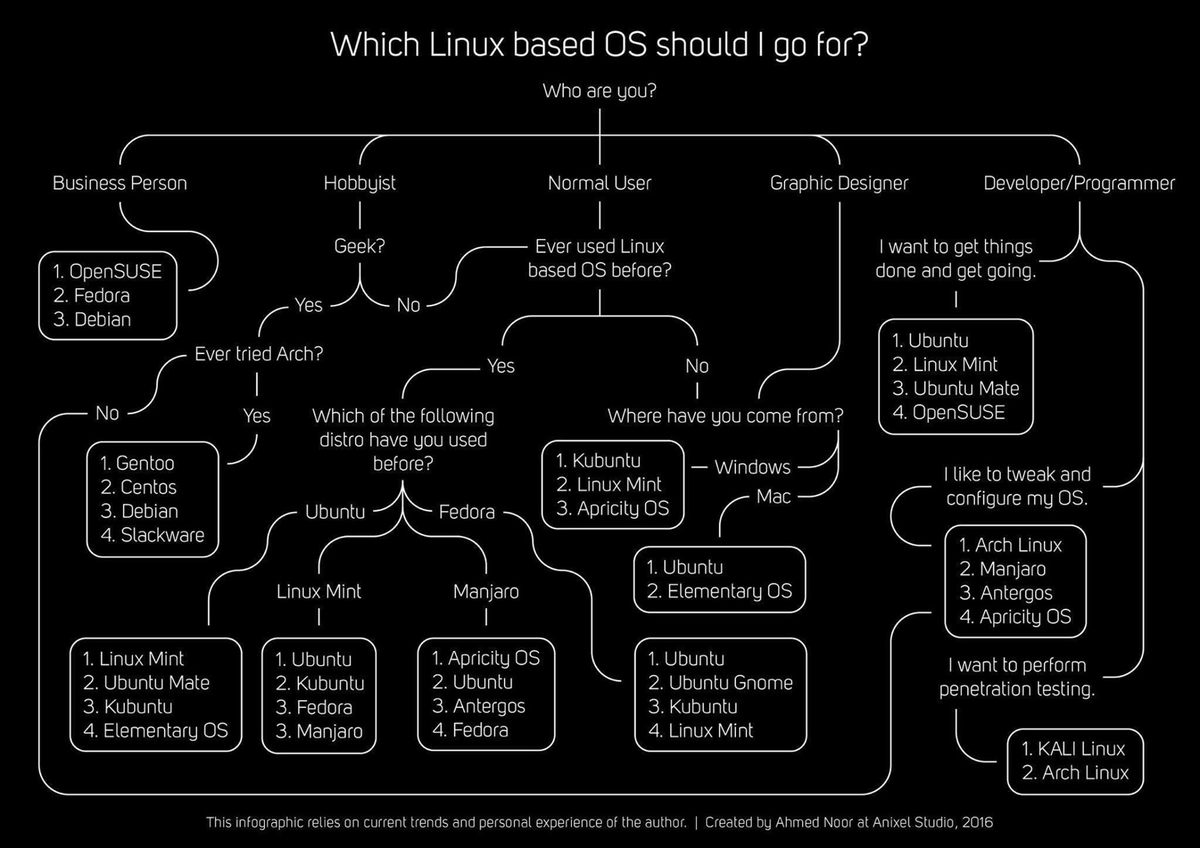
Interesting Infographic #linux_tips #linux_howto #linux For a daily driver, I suggest using Linux distros like Pop!_OS, Linux Mint, Fedora. What’s your current Linux distro and have you stopped distro hopping yet? cc: @thelinuxEXP@mastodon.social, @jay@learnlinux.social
Self-hosted installation on #linux @bitwarden@fosstodon.org #linux_tips #linux_howto #opensource youtu.be/cumY3x8t1Sk
We have two types of path 1) Absolute path, 2)Relative path 1) Absolute path : It start with root directory (/) and follows the tree branch untill path of desired directory or file completed. Ex. cd /home/me/practice #Linux_commands #Linux_tips #linuxBasics #learnlinux #linux
On Ubuntu, to show the git branch on your terminal, add the following line to your .bashrc: PS1="${debian_chroot:+($debian_chroot)}\[\033[01;32m\]\u@\h\[\033[00m\]:\[\033[01;34m\]\w\[\033[00m\]\[\e[91m\]\$(__git_ps1 ' [%s]')\[\e[00m\]\$ " #Linux_Tips 🐧

On Ubuntu, to show the git branch on your terminal, add the following line to your .bashrc: PS1="${debian_chroot:+($debian_chroot)}\[\033[01;32m\]\u@\h\[\033[00m\]:\[\033[01;34m\]\w\[\033[00m\]\[\e[91m\]\$(__git_ps1 ' [%s]')\[\e[00m\]\$ " #Linux_Tips 🐧
Are you Missing the "Untitled Document" on right click on Ubuntu 18.04/18.10, re enable it again by typing this in the Terminal: touch ~/Templates/Untitled\ Document Peace! #linux #linux_tips
Interesting Infographic #linux_tips #linux_howto #linux For a daily driver, I suggest using Linux distros like Pop!_OS, Linux Mint, Fedora. What’s your current Linux distro and have you stopped distro hopping yet? cc: @thelinuxEXP@mastodon.social, @jay@learnlinux.social
RT @ianonymous3000@mastodon.social Interesting Infographic #linux_tips #linux_howto #linux For a daily driver, I suggest using Linux distros like Pop!_OS, Linux Mint, Fedora. What’s your current Linux distro and have y… mastodon.social/@ianonymous300…
Something went wrong.
Something went wrong.
United States Trends
- 1. FIFA 446K posts
- 2. Mark Pope N/A
- 3. #ROHFinalBattle 3,221 posts
- 4. Gonzaga 2,477 posts
- 5. Matt Campbell 12.3K posts
- 6. #JingleBellJohn N/A
- 7. Frank Gehry 7,064 posts
- 8. Vizio N/A
- 9. Hep B 19.3K posts
- 10. Ace Austin N/A
- 11. #UFC326 1,983 posts
- 12. Iowa State 10.4K posts
- 13. Zags N/A
- 14. The EU 241K posts
- 15. Jordan Walsh 3,756 posts
- 16. Brandon Garrison N/A
- 17. Hisense 1,273 posts
- 18. HOLD THE LINE 6,328 posts
- 19. Warner Bros 277K posts
- 20. Briles N/A