
#100daysofswiftui search results
🎉 I just finished Day 88 of the #100DaysOfSwiftUI at hackingwithswift.com/100/swiftui/88 via @twostraws

The past week I've been working on my custom redesign for the Moonshot project. ...Houston? (@twostraws).. We have liftoff 🚀 Full facelift: UI mockup in Figma, modified JSON for addtl. data, and more.. About 9.5 hrs. more in comments 👇 #100DaysOfSwiftUI #HackingWithSwift

🎉 I just finished Day 0 of the #100DaysOfSwiftUI at hackingwithswift.com/100/swiftui/0 via @twostraws

🎉 I just finished Day 50 of the #100DaysOfSwiftUI at hackingwithswift.com/100/swiftui/50 via @twostraws - Using Codable and CodingKeys to encode classes - Using haptic feedback - Building a demo project

Project 20: SnowSeeker Built a ski resort browser optimized for - iPad with split-view navigation. - Search resorts - View adaptive layouts - Tap facility icons, and - Save favorites with persistence. #SwiftUI #100DaysOfSwiftUI #buildinginpublic



🎉 I just finished Day 40 of the #100DaysOfSwiftUI at hackingwithswift.com/100/swiftui/40 via @twostraws

🎉 I just finished Day 100 of the #100DaysOfSwiftUI at hackingwithswift.com/100/swiftui/100 via @twostraws
🎉 I just finished Day 91 of the #100DaysOfSwiftUI at hackingwithswift.com/100/swiftui/91 via @twostraws

🎉 I just finished Day 39 of the #100DaysOfSwiftUI at hackingwithswift.com/100/swiftui/39 via @twostraws
Project 19: HighRoller 🎲 Built a dice rolling app to wrap up Users can pick dice type, roll multiple dice, animate the results, and save history with JSON. Reminded me of MapleStory when you first create your character. (iykyk) #SwiftUI #100DaysOfSwiftUI #buildinpublic
🎉 I just finished Day 92 of the #100DaysOfSwiftUI at hackingwithswift.com/100/swiftui/92 via @twostraws
🎉 I just finished Day 93 of the #100DaysOfSwiftUI at hackingwithswift.com/100/swiftui/93 via @twostraws

🎉 I just finished Day 95 of the #100DaysOfSwiftUI at hackingwithswift.com/100/swiftui/95 via @twostraws
🎉 I just finished Day 96 of the #100DaysOfSwiftUI at hackingwithswift.com/100/swiftui/96 via @twostraws
🎉 I just finished Day 99 of the #100DaysOfSwiftUI at hackingwithswift.com/100/swiftui/99 via @twostraws
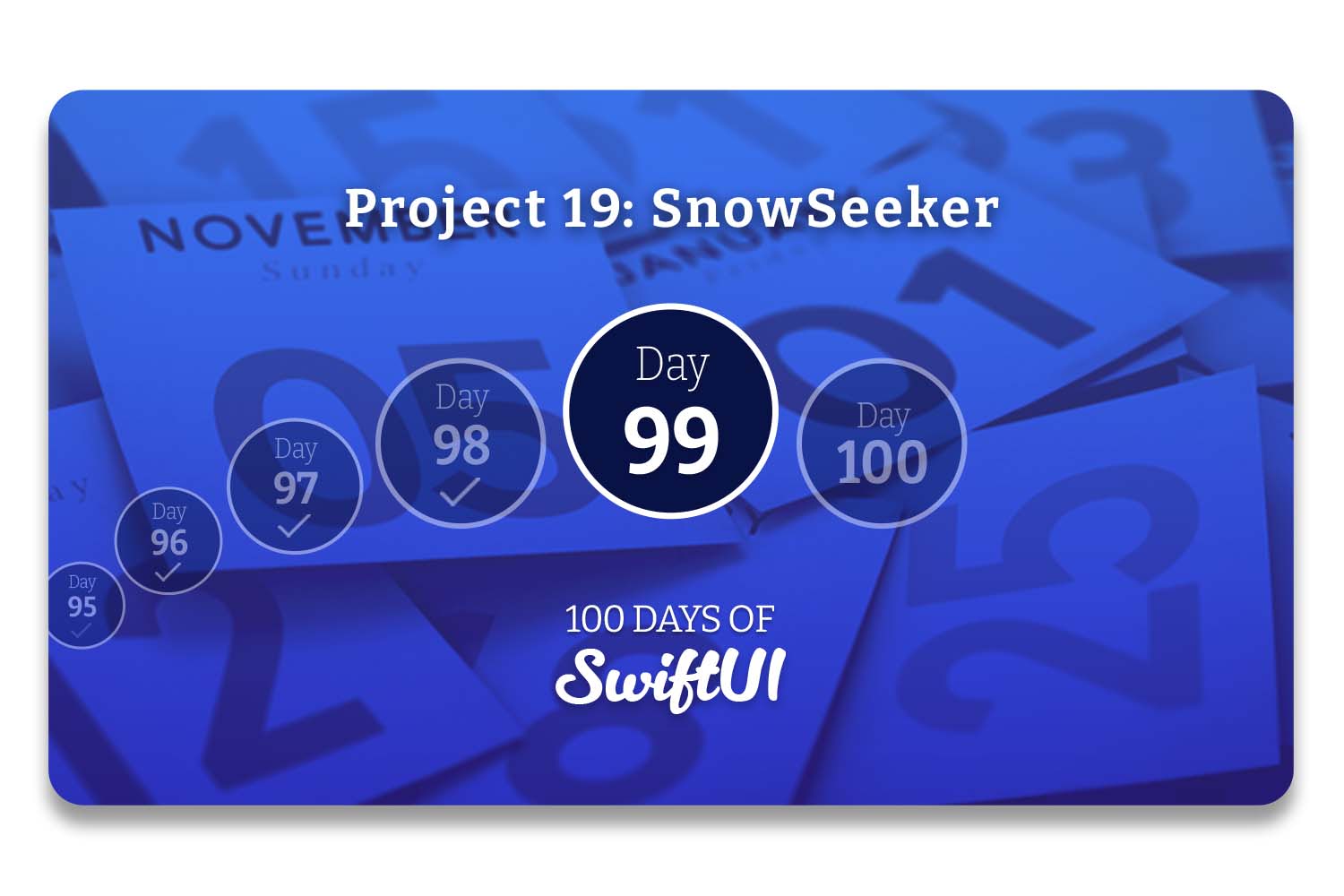
🎉 I just finished Day 83 of the #100DaysOfSwiftUI at hackingwithswift.com/100/swiftui/83 via @twostraws
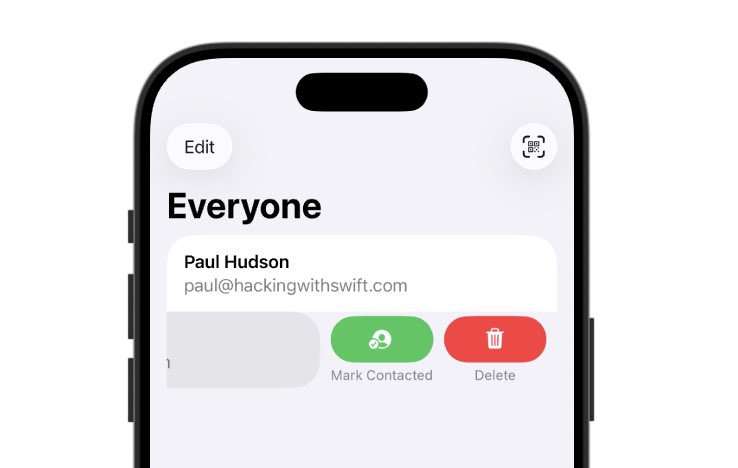

It's been a week, still chipping away at it. I've started working on my own app in between studying. 🎉 I just finished Day 21 - 31 of the #100DaysOfSwiftUI at hackingwithswift.com/100/swiftui/31 via @twostraws Some screenshots from this course are below.
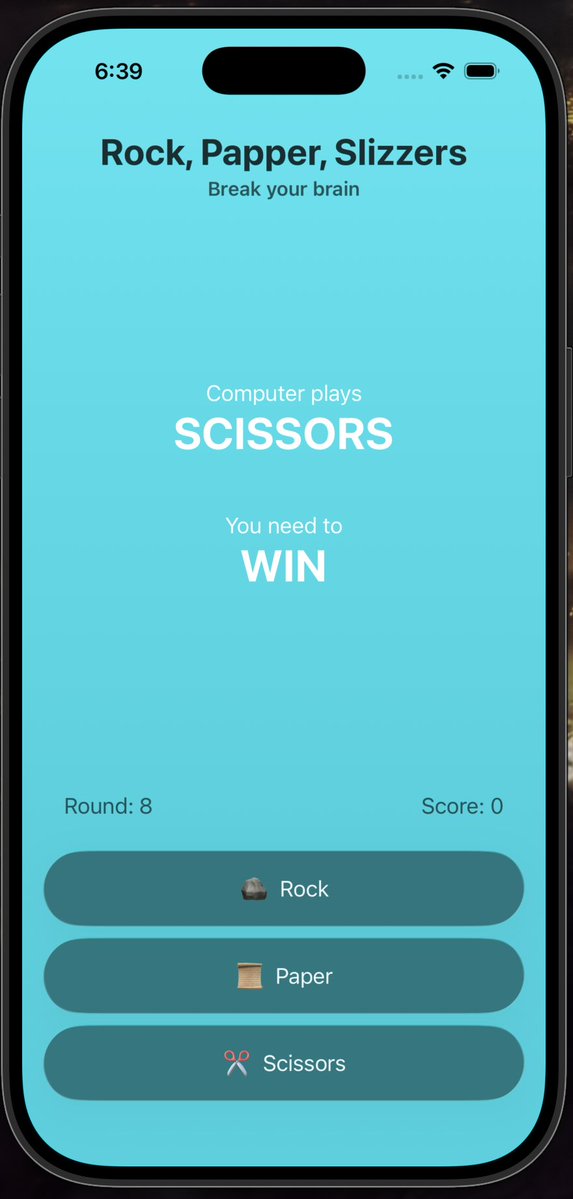
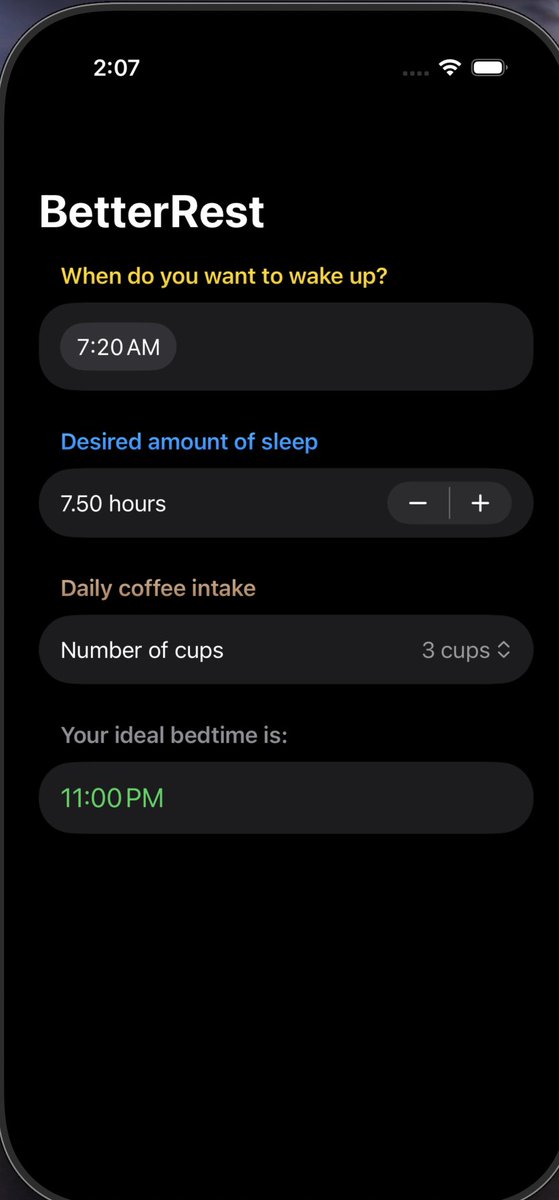
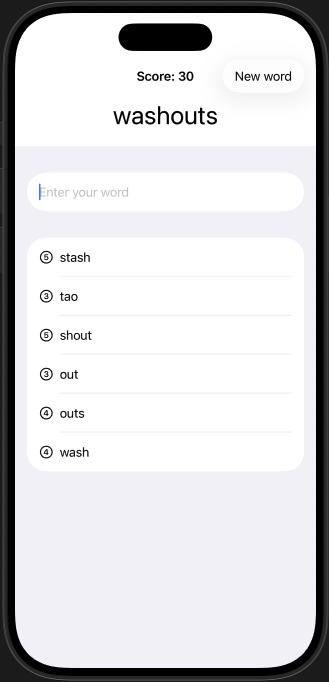
🎉 I just finished Day 0 of the #100DaysOfSwiftUI at hackingwithswift.com/100/swiftui/0 via @twostraws

🎉 I just finished Day 27 of the #100DaysOfSwiftUI at hackingwithswift.com/100/swiftui/27 via @twostraws

🎉 I just finished Day 88 of the #100DaysOfSwiftUI at hackingwithswift.com/100/swiftui/88 via @twostraws

Didn't post before. But was doing the whole stuff. Thanks, @twostraws! 🎉 I just finished Day 22 of the #100DaysOfSwiftUI at hackingwithswift.com/100/swiftui/22

🎉 I just finished Day 22 of the #100DaysOfSwiftUI at hackingwithswift.com/100/swiftui/22 via @twostraws #swiftUI #ios

🎉 I just finished Day 37 of the #100DaysOfSwiftUI at hackingwithswift.com/100/swiftui/37 via @twostraws DAY 37 DONE! tomorrow ill do the next wrap up, can't wait for day 40
🎉 I just finished Day 39 of the #100DaysOfSwiftUI at hackingwithswift.com/100/swiftui/39 via @twostraws

🎉 I just finished Day 77 of the #100DaysOfSwiftUI at hackingwithswift.com/100/swiftui/77 via @twostraws Milestone challenge, starting to see the finish line

🎉 I just finished Day 42 of the #100DaysOfSwiftUI at hackingwithswift.com/100/swiftui/42 via @twostraws
🎉 I just finished Day 76 of the #100DaysOfSwiftUI at hackingwithswift.com/100/swiftui/76 via @twostraws Accessibility wrap up
🎉 I just finished Day 75 of the #100DaysOfSwiftUI at hackingwithswift.com/100/swiftui/75 via @twostraws Apple did a great job with using accessibility tools
🎉 I just finished Day 80 of the #100DaysOfSwiftUI at hackingwithswift.com/100/swiftui/80 via @twostraws
🎉 I just finished Day 87 of the #100DaysOfSwiftUI at hackingwithswift.com/100/swiftui/87 via @twostraws

🎉 I just finished Day 5 of the #100DaysOfSwiftUI at hackingwithswift.com/100/swiftui/5 via @twostraws Hope everyone had a nice Thanksgiving and enjoying the rest of the weekend! :D Anyone else also just sort of disassociate after Thanksgiving to recoup? 😂😭

🎉 I just finished Day 49 of the #100DaysOfSwiftUI at hackingwithswift.com/100/swiftui/49 via @twostraws

🎉 I just finished Day 8 of the #100DaysOfSwiftUI at hackingwithswift.com/100/swiftui/8 via @twostraws

🎉 I just finished Day 0 of the #100DaysOfSwiftUI at hackingwithswift.com/100/swiftui/0 via @twostraws
🎉 I just finished Day 21 of the #100DaysOfSwiftUI at hackingwithswift.com/100/swiftui/21 via @twostraws #swiftUI #ios
🎉 I just finished Day 41 of the #100DaysOfSwiftUI at hackingwithswift.com/100/swiftui/41 via @twostraws

🎉 I just finished Day 36 of the #100DaysOfSwiftUI at hackingwithswift.com/100/swiftui/36 via @twostraws its been a while since day 34 because I was on my final exams at college but im back to keep going every time I fail I come back until I win, also day 35 coming soon


Day 86 of the #100DaysOfSwiftUI FlashZilla: Project 17 - Day 1 this iOS app is all about iOS Gestures! learned about: - how to use gestures in SwiftUI: onTap, onLongPress, Magification, Rotation, Drag, Sequenced gestures - Disabling user interactivity with allowsHitTesting()



🎉 I just finished Day 70 of the #100DaysOfSwiftUI via @twostraws Well, sort of Apparently the onLongPressGesture is not working I tried simulating it on my phone and it's not working on there either


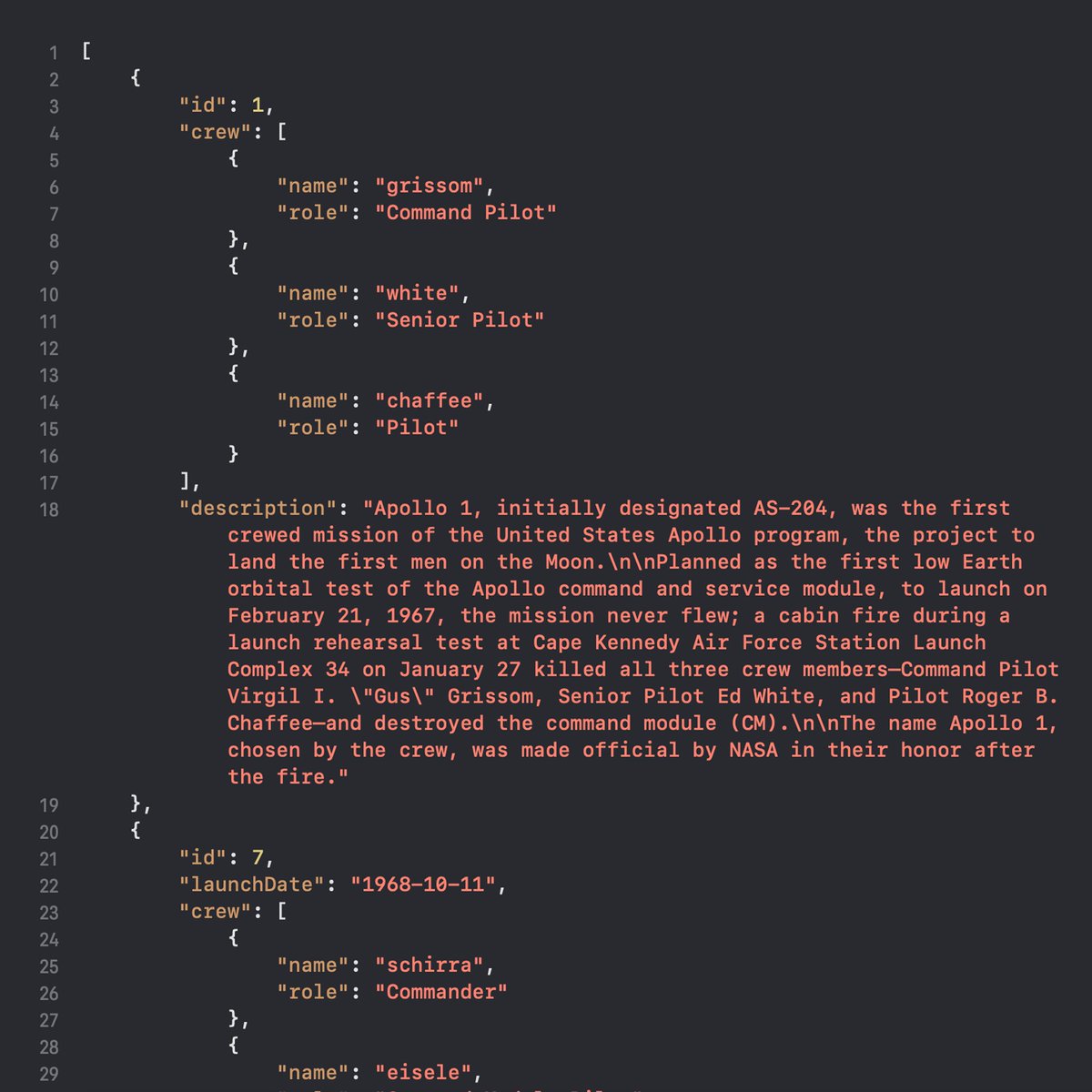
☑️ Day 40 of #100DaysOfSwiftUI The Apollo Missions app is beginning to take shape. All text content in this app is decoded from two JSON files, which turned out to be so convenient but somewhat cumbersome to write.
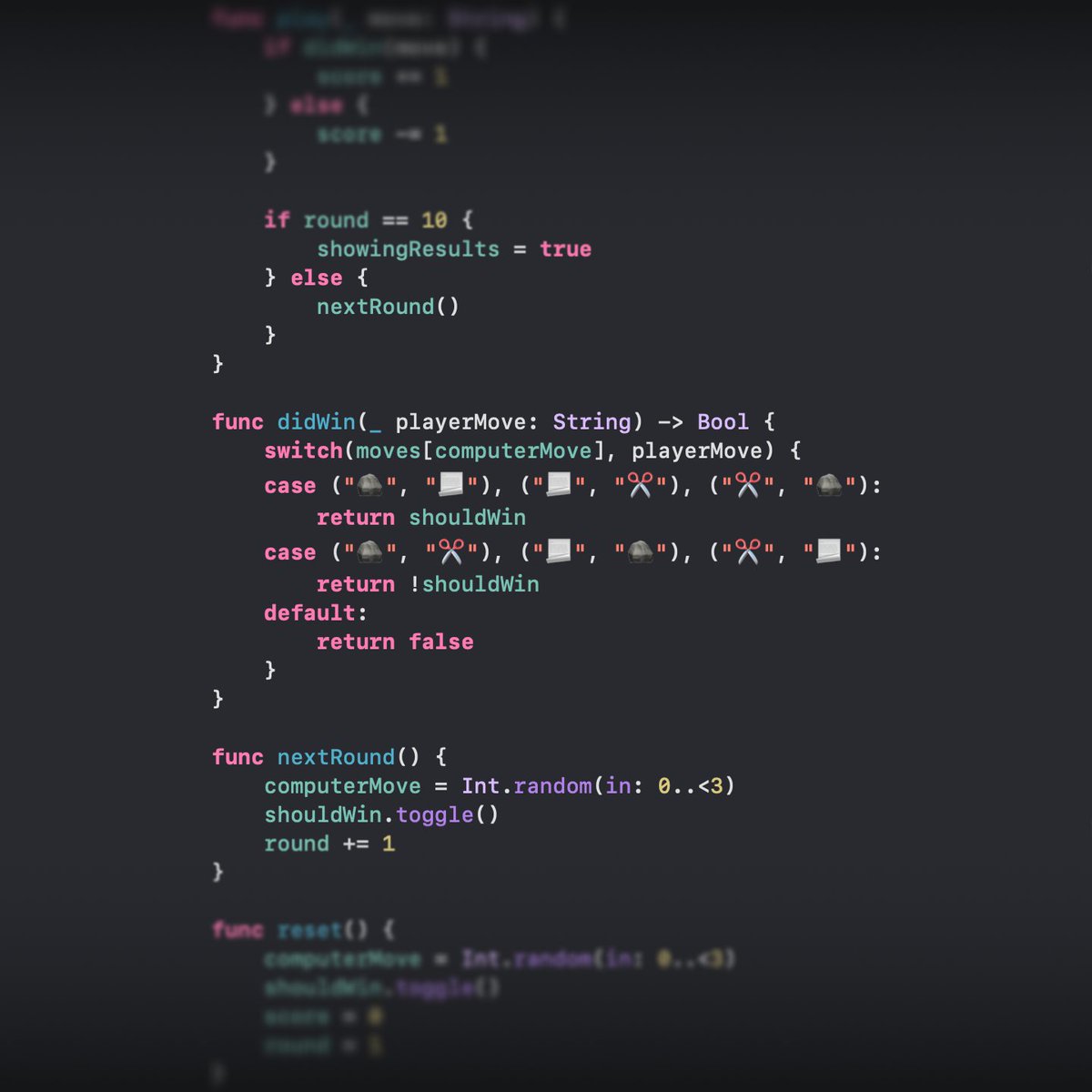
☑️ Day 25 of #100DaysOfSwiftUI After a busy few days, I dove into a new challenge: building a Rock-Paper-Scissors game! The biggest puzzle? Creating a function to determine winning moves. 🤔 It took some serious brainpower, but the journey was both fun and challenging.
🎉 I just finished Day 71 of the #100DaysOfSwiftUI via @twostraws I solved the issue with the long press gesture not working I had to use the simultaneous gesture

Day 94 of the #100DaysOfSwiftUI LayoutAndGeometry: Project 18 - Day 3 this is a technique project focusing on creating more advanced layout alignments, building special effects using GeometryReader completed all 3 challenges: - Made views at the top fade out to 0 opacity (1/2)


🎉 I just finished Day 67 of the #100DaysOfSwiftUI at hackingwithswift.com/100/swiftui/67 via @twostraws

🔄 ✅ Day 111 [ #100DaysOfSwiftUI ] I'm pausing Stanford's CS193p course for now because I want to dive into the topic of Apple Watch development. This was an Apple tutorial to understand how to set up a companion app for an existing iOS app. P.S. I'll add the tutorial below.
![bucklajean's tweet image. 🔄 ✅ Day 111 [ #100DaysOfSwiftUI ] I'm pausing Stanford's CS193p course for now because I want to dive into the topic of Apple Watch development.
This was an Apple tutorial to understand how to set up a companion app for an existing iOS app.
P.S. I'll add the tutorial below.](https://pbs.twimg.com/media/GhPCTdlXcAAQgHm.jpg)
⌚ Day 112 [ #100DaysOfSwiftUI ] studying WatchConnectivity. WatchConnectivity enables iPhone and Apple Watch communication, ensuring reliable delivery even when inactive, perfect for syncing tasks and managing complications.
![bucklajean's tweet image. ⌚ Day 112 [ #100DaysOfSwiftUI ] studying WatchConnectivity.
WatchConnectivity enables iPhone and Apple Watch communication, ensuring reliable delivery even when inactive, perfect for syncing tasks and managing complications.](https://pbs.twimg.com/media/Ghbz_AOXwAAk5uf.jpg)
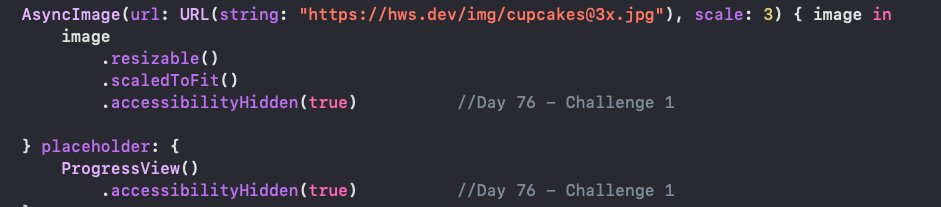
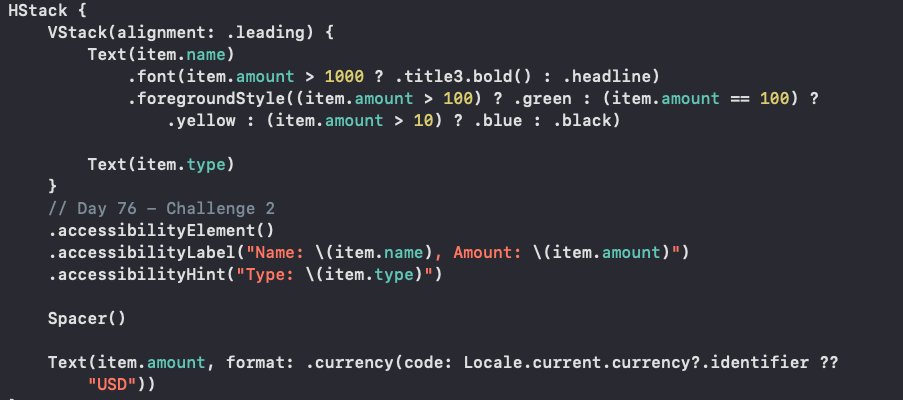
Day 76 of the #100DaysOfSwiftUI Accessibility: Project 15 - Day 3 (technique project focusing on SwiftUI Accessibility) completed all 3 challenges: - Hidden decorative images in CupcakeCorner(P10) CheckoutView - List in iExpense (P7) reads out name & value in one VoiceOverLabel




Day 96 of the #100DaysOfSwiftUI SnowSeeker: Project 19 - Day 1 learned about: - working with two side by side views using NavigationSplitView() - using alert & sheet with optionals - using groups as Transparent Layout Containers


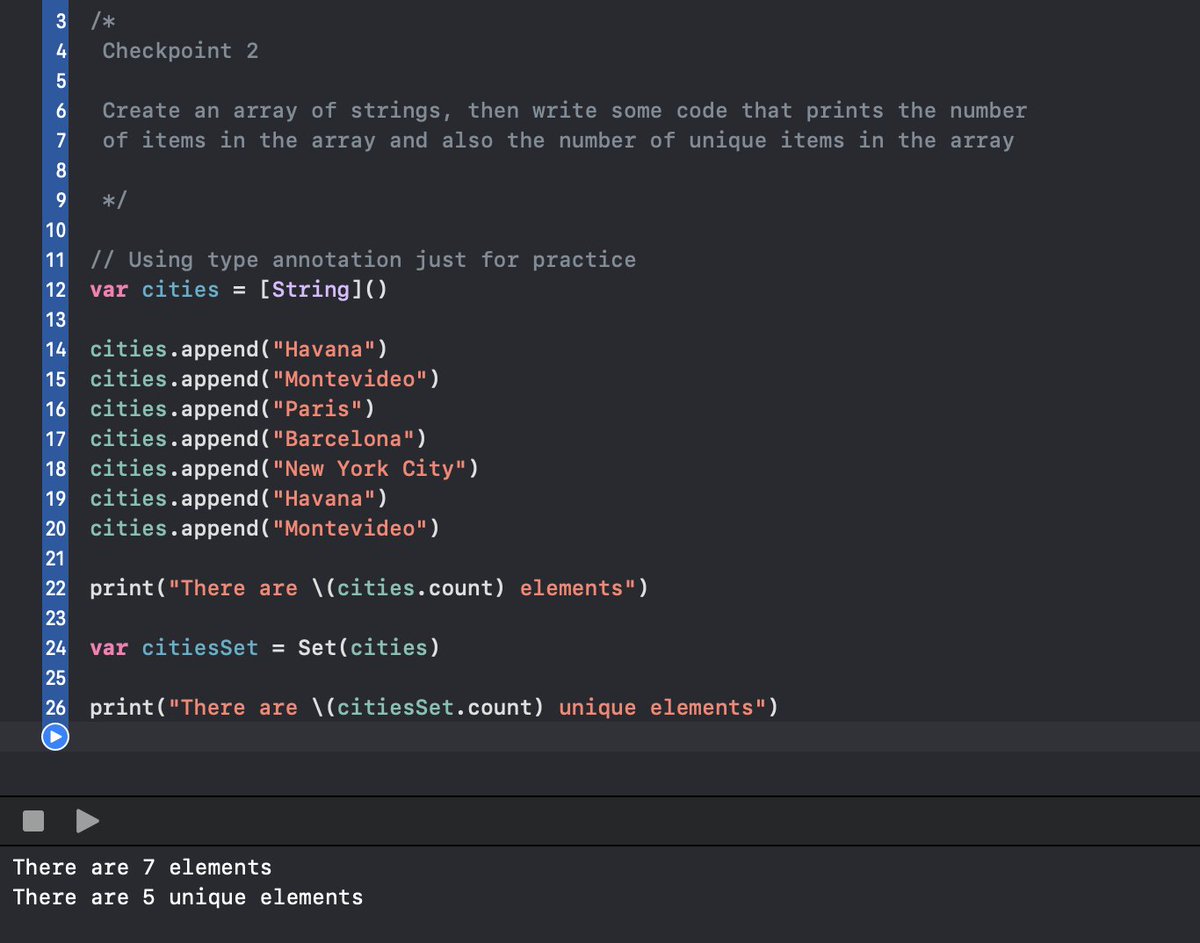
✅Day 4 of the #100DaysOfSwiftUI I have to say, knowing how to program, my first instinct was to use a loop to find how many unique items were in the array. However, the solution turned out to be much simpler—sometimes, the basics are all you need to solve a problem.
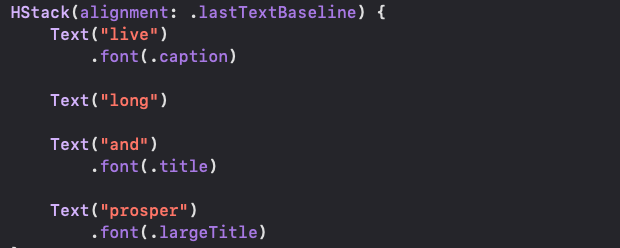
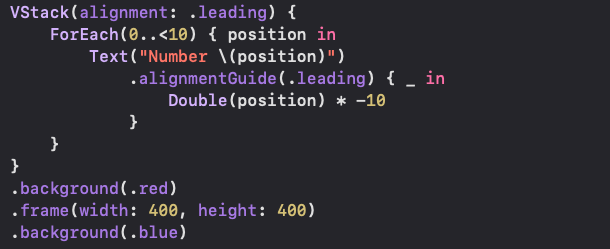
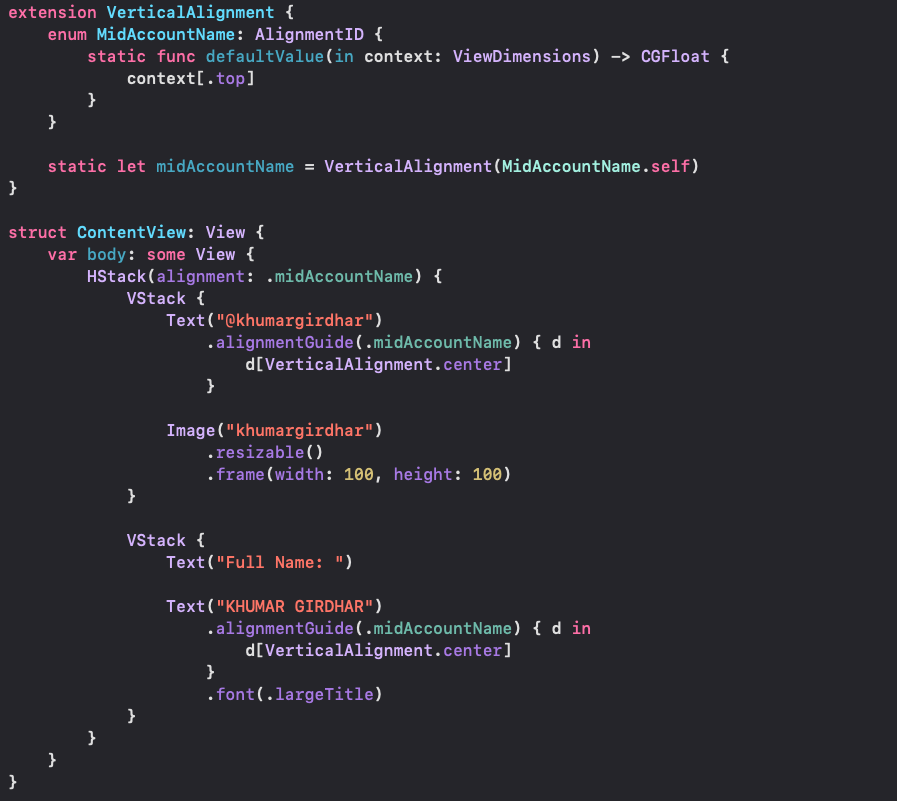
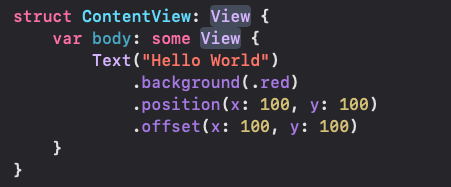
Day 92 of the #100DaysOfSwiftUI LayoutAndGeometry: Project 18 - Day 1 this project is about creating more advanced layout alignments, building special effects using GeometryReader, & more learned about: - how layouts work - alignment & alignment guides - create custom alignment
✅ Day 97 (final part 3) of #100DaysOfSwiftUI : adding a ResortDetailView. - Resort image & description - Facilities in natural language - Info about size, price, elevation & snow depth



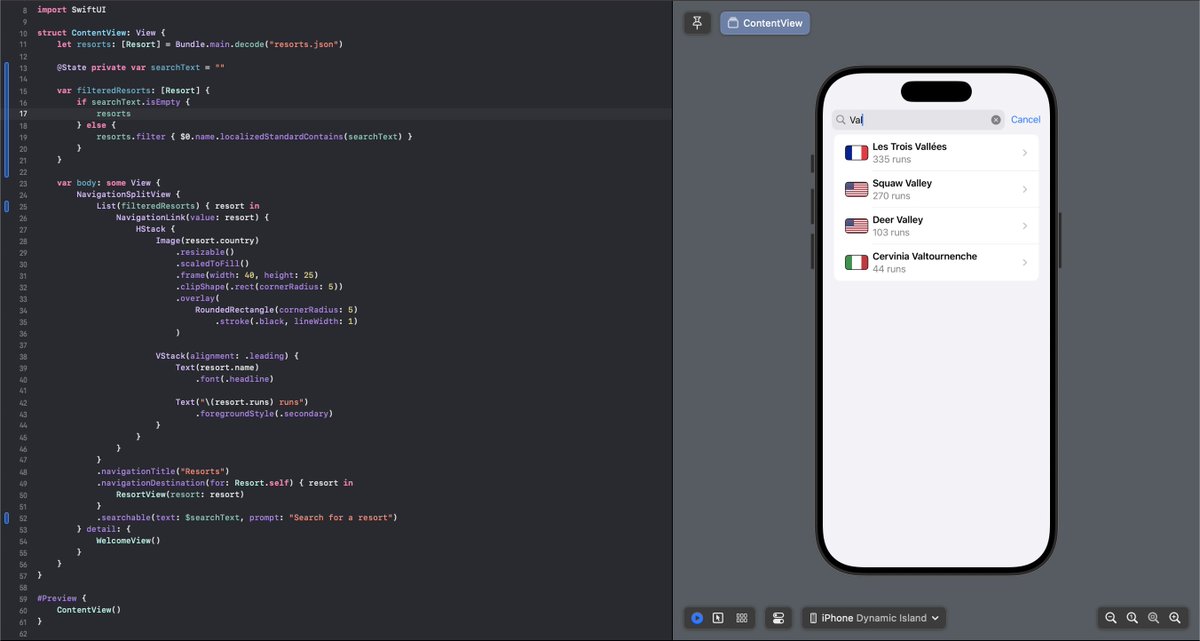
⏳ Day 97 (part 1) of #100DaysOfSwiftUI : built a primary list for a SnowSeeker ski resort app 🎿🗻 Featuring a Resort struct and JSON data decoding to use info from json file, and a NavigationSplitView layout for iPad usage.

Something went wrong.
Something went wrong.
United States Trends
- 1. Broncos 35.5K posts
- 2. Mariota 10.7K posts
- 3. Bo Nix 8,513 posts
- 4. Treylon Burks 10.9K posts
- 5. #RaiseHail 5,204 posts
- 6. #BaddiesUSA 19.6K posts
- 7. Commanders 28.5K posts
- 8. Ertz 2,912 posts
- 9. #RHOP 10.4K posts
- 10. #ITWelcomeToDerry 15K posts
- 11. Chicharito 25.3K posts
- 12. #Married2Med 2,935 posts
- 13. Bobby Wagner N/A
- 14. Denver 14K posts
- 15. Tomlin 25.1K posts
- 16. Riley Moss 2,138 posts
- 17. Sean Payton 1,248 posts
- 18. Zach Edey 2,237 posts
- 19. Alex Singleton 1,084 posts
- 20. Collinsworth 2,352 posts