

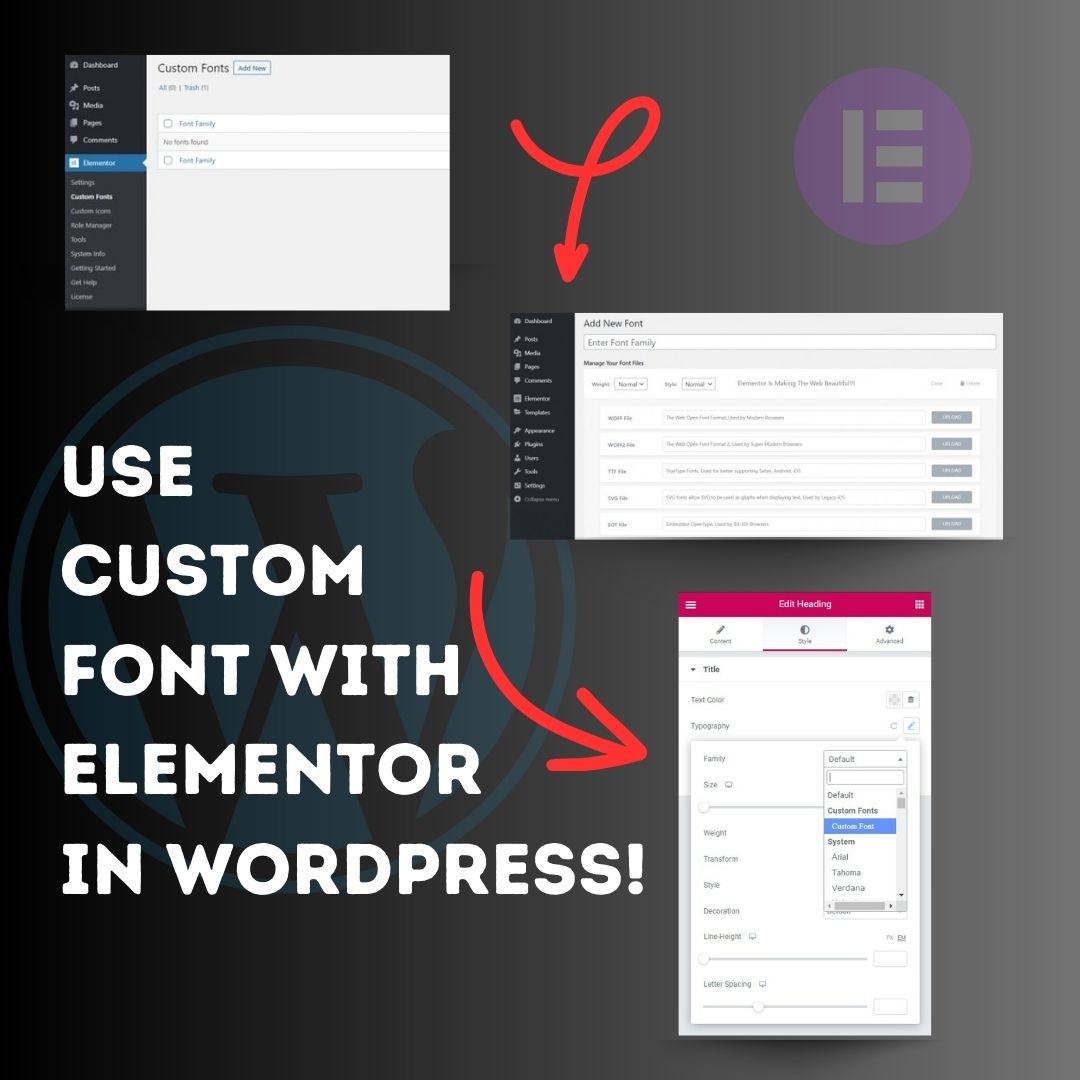
Use custom font with Elementor in WordPress! 1. Head over to the WordPress Dashboard > Elementor > Custom Fonts, and click ‘Add new’. 2. Now, add any font by adding the font name and uploading its WOFF, WOFF2, TTF, SVG or EOT file. 3. Now custom fonts will be available
United States 트렌드
- 1. Gunther 87.9K posts
- 2. Spurs 68.9K posts
- 3. John Cena 543K posts
- 4. #SNME 291K posts
- 5. Triple H 93.5K posts
- 6. #ThankYouCena 438K posts
- 7. Wemby 47.5K posts
- 8. Bondi Beach 20.4K posts
- 9. Chet 16.2K posts
- 10. #UFCVegas112 21.4K posts
- 11. Caruso 7,529 posts
- 12. Brown University 217K posts
- 13. Thunder 46.1K posts
- 14. Vince 19.8K posts
- 15. #Toonami 2,643 posts
- 16. Never Give Up 38.1K posts
- 17. Kape 6,522 posts
- 18. #JungkookxElleKorea 59.3K posts
- 19. Heisman 66.3K posts
- 20. Chrisean 6,131 posts
Loading...
Something went wrong.
Something went wrong.