

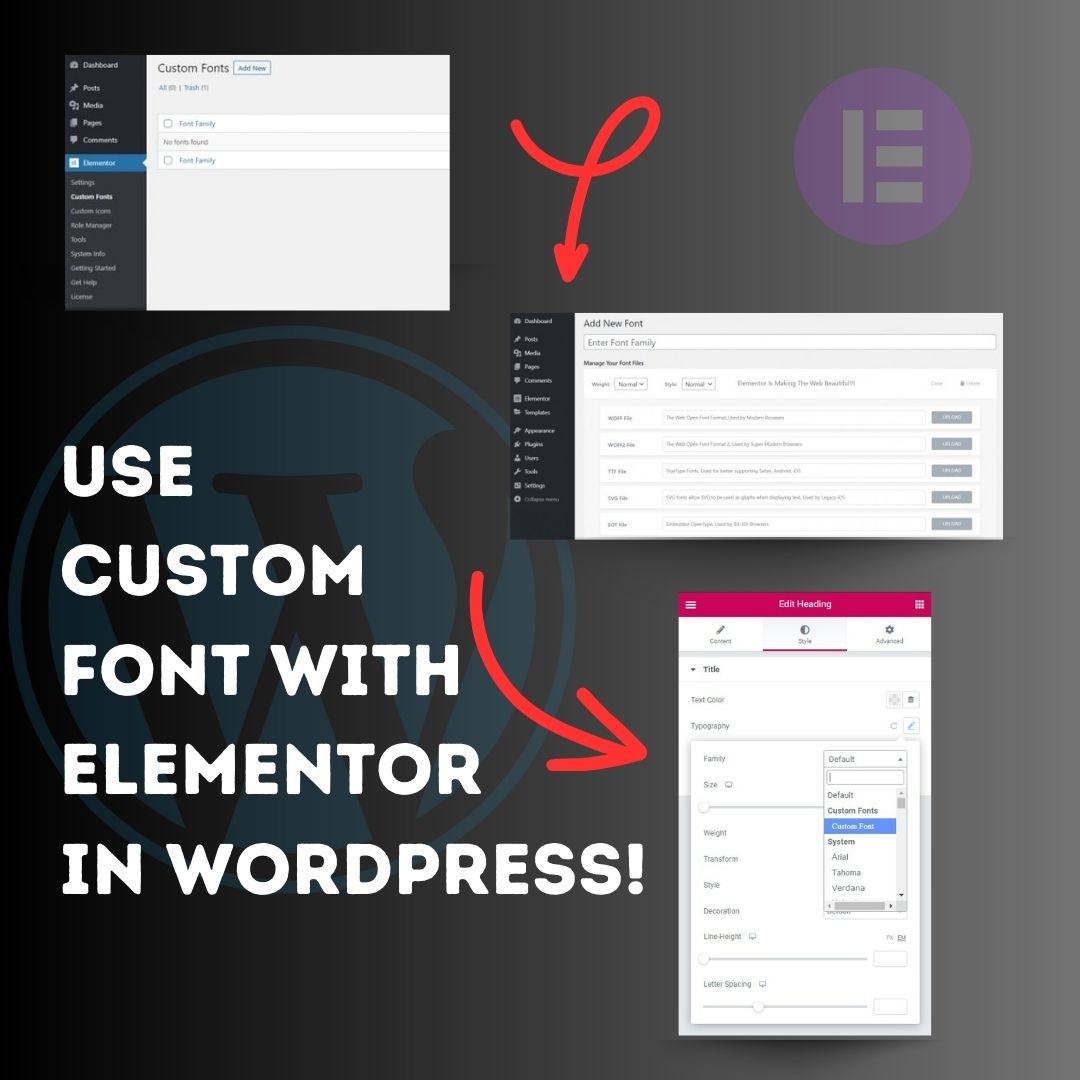
Use custom font with Elementor in WordPress! 1. Head over to the WordPress Dashboard > Elementor > Custom Fonts, and click ‘Add new’. 2. Now, add any font by adding the font name and uploading its WOFF, WOFF2, TTF, SVG or EOT file. 3. Now custom fonts will be available
United States トレンド
- 1. Rob Reiner 278K posts
- 2. Good Monday 35.1K posts
- 3. All in the Family 29.7K posts
- 4. Meathead 8,255 posts
- 5. #MondayMotivation 6,872 posts
- 6. The Princess Bride 19.5K posts
- 7. #ITWelcomeToDerry 176K posts
- 8. Stand By Me 22.8K posts
- 9. When Harry Met Sally 23.1K posts
- 10. Cowboys 38.9K posts
- 11. Spinal Tap 19.1K posts
- 12. Brentwood 21.4K posts
- 13. Chile 782K posts
- 14. Pennywise 66.6K posts
- 15. Ella Cook 29K posts
- 16. Shaq 5,834 posts
- 17. Brooks 34K posts
- 18. LAPD 9,994 posts
- 19. The Sure Thing 25.5K posts
- 20. Rest in Peace 58.2K posts
Loading...
Something went wrong.
Something went wrong.