

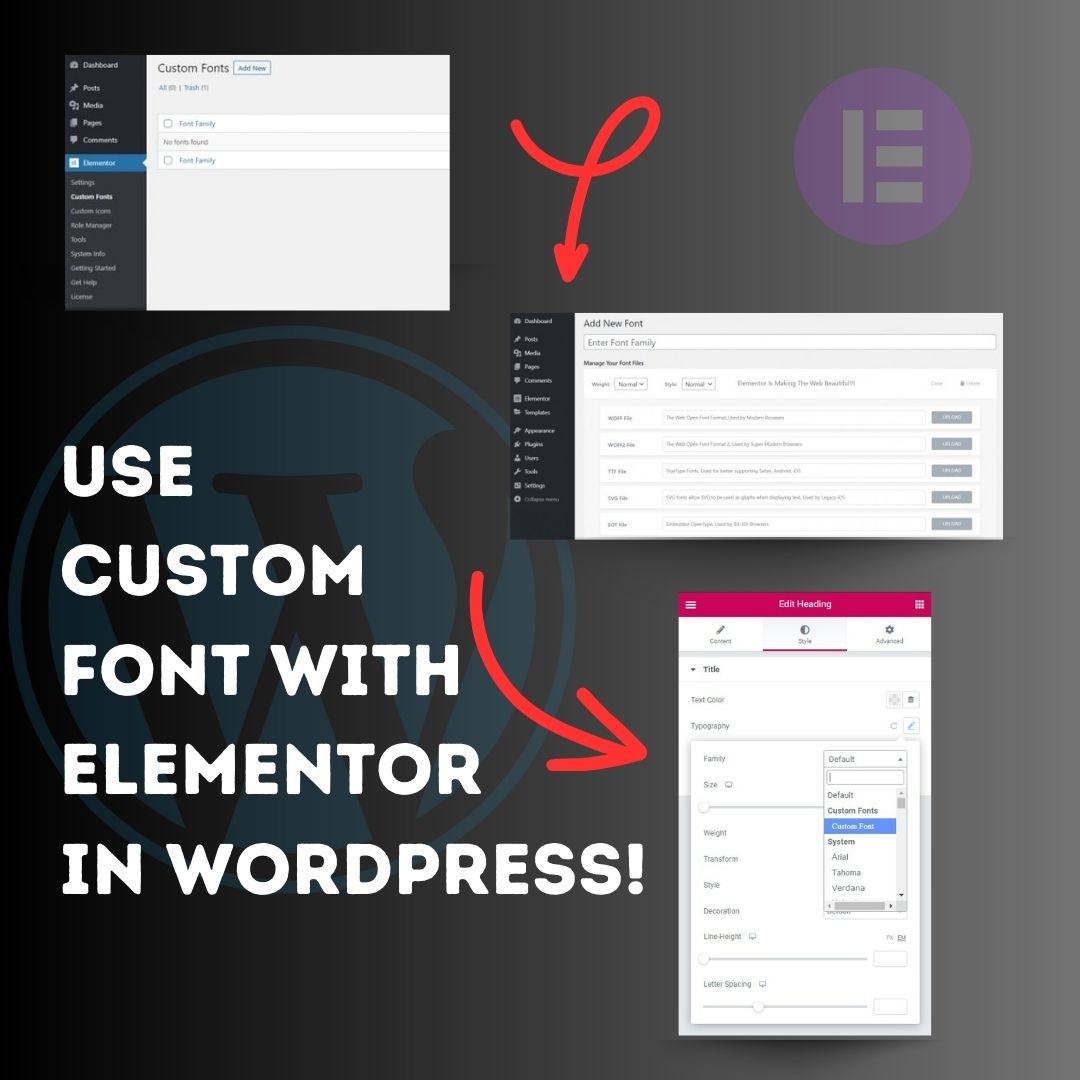
Use custom font with Elementor in WordPress! 1. Head over to the WordPress Dashboard > Elementor > Custom Fonts, and click ‘Add new’. 2. Now, add any font by adding the font name and uploading its WOFF, WOFF2, TTF, SVG or EOT file. 3. Now custom fonts will be available
United States Trends
- 1. Rob Reiner 366K posts
- 2. Good Monday 48.6K posts
- 3. #IDontWantToOverreactBUT N/A
- 4. #MondayMotivation 9,328 posts
- 5. Victory Monday 1,563 posts
- 6. All in the Family 33K posts
- 7. #pbdpodcast N/A
- 8. Meathead 10.8K posts
- 9. #MondayVibes 3,422 posts
- 10. Stand By Me 31.2K posts
- 11. The Princess Bride 25.1K posts
- 12. Ella Cook 40.5K posts
- 13. When Harry Met Sally 31.2K posts
- 14. #MondayMood 1,120 posts
- 15. Josh Bell N/A
- 16. Bill of Rights Day N/A
- 17. James Evans N/A
- 18. Chile 873K posts
- 19. Spinal Tap 23.3K posts
- 20. Shaq 6,479 posts
Loading...
Something went wrong.
Something went wrong.