

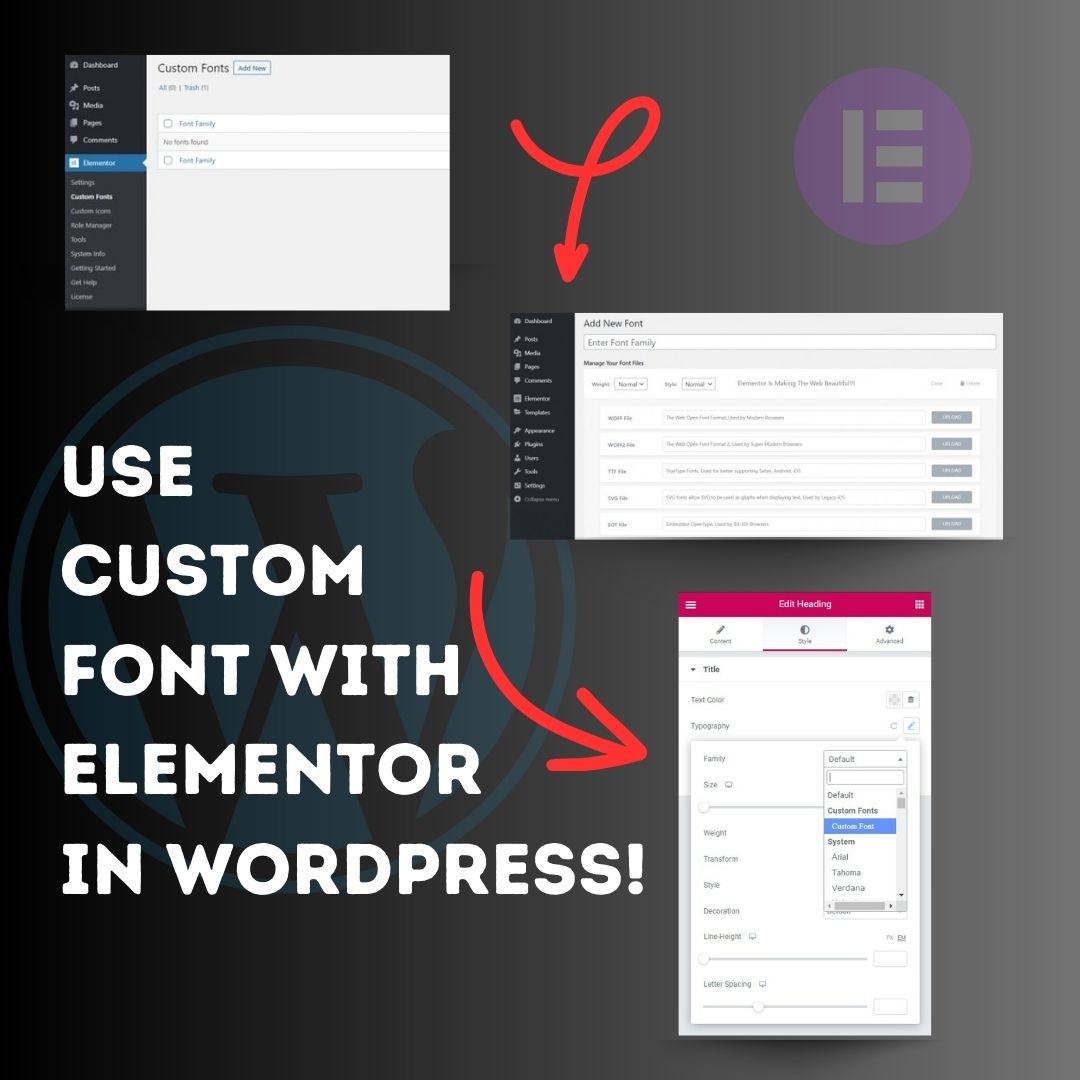
Use custom font with Elementor in WordPress! 1. Head over to the WordPress Dashboard > Elementor > Custom Fonts, and click ‘Add new’. 2. Now, add any font by adding the font name and uploading its WOFF, WOFF2, TTF, SVG or EOT file. 3. Now custom fonts will be available
United States الاتجاهات
- 1. Rob Reiner 459K posts
- 2. Charlie Kirk 174K posts
- 3. Lagway 3,311 posts
- 4. Truth Social 10.4K posts
- 5. #IDontWantToOverreactBUT N/A
- 6. #pbdpodcast N/A
- 7. #MondayMotivation 11.3K posts
- 8. Dustin 32.1K posts
- 9. Victory Monday 3,505 posts
- 10. #MondayMorning 1,897 posts
- 11. Meathead 12.9K posts
- 12. Trump Derangement Syndrome 9,886 posts
- 13. NextNRG Inc N/A
- 14. Steve Rogers 7,142 posts
- 15. Steve Wilks 2,147 posts
- 16. Turtle Island Liberation Front 3,855 posts
- 17. $TSLA 122K posts
- 18. New Year's Eve 20.6K posts
- 19. Josh Bell 1,025 posts
- 20. Prime Rib N/A
Loading...
Something went wrong.
Something went wrong.