

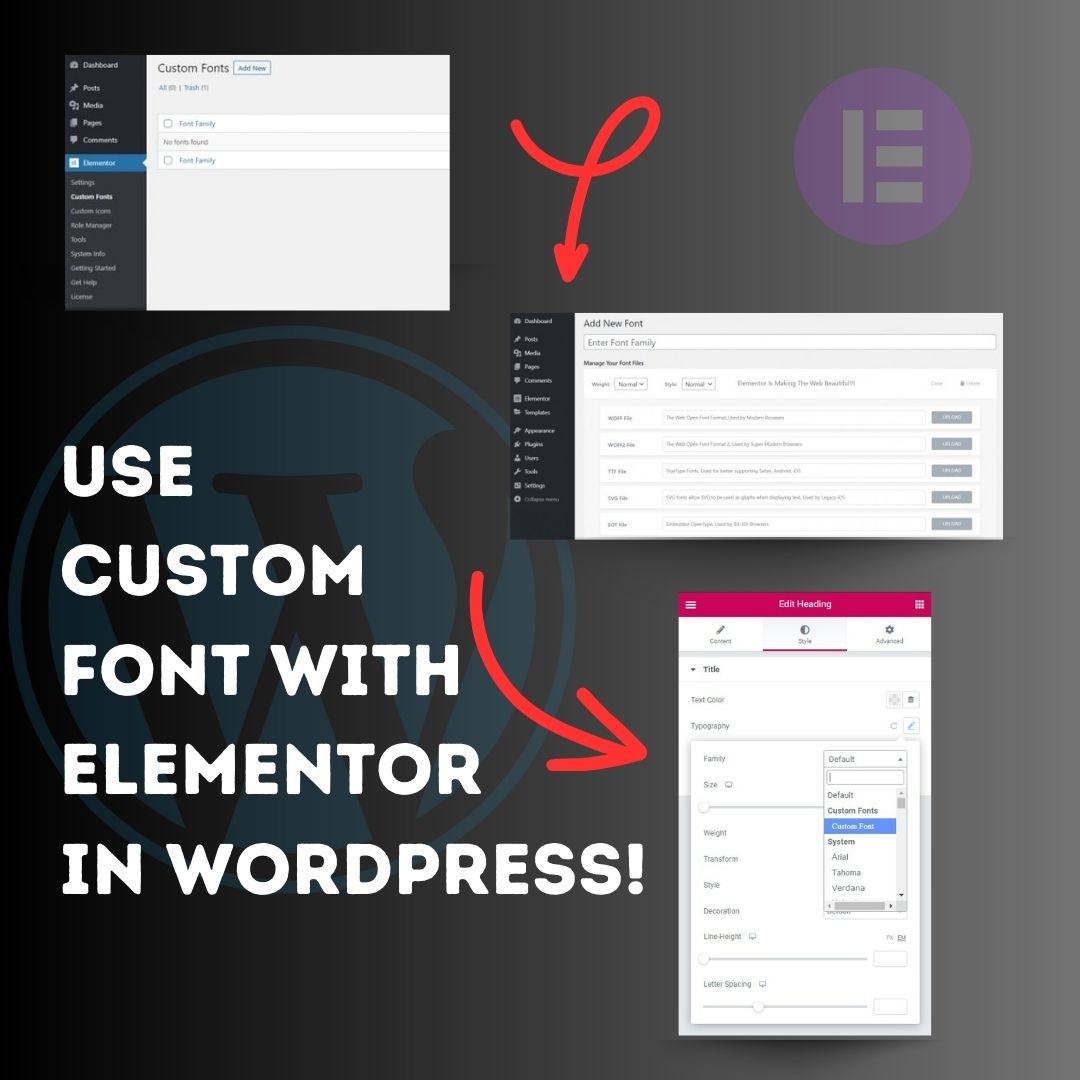
Use custom font with Elementor in WordPress! 1. Head over to the WordPress Dashboard > Elementor > Custom Fonts, and click ‘Add new’. 2. Now, add any font by adding the font name and uploading its WOFF, WOFF2, TTF, SVG or EOT file. 3. Now custom fonts will be available
United States Trends
- 1. Bills 102K posts
- 2. Australia 1.19M posts
- 3. Patriots 108K posts
- 4. Drake Maye 14.3K posts
- 5. McDermott 5,900 posts
- 6. McDermott 5,900 posts
- 7. Pats 10.4K posts
- 8. #Browns 3,227 posts
- 9. Zay Flowers 1,549 posts
- 10. Islam 518K posts
- 11. Henderson 11.6K posts
- 12. Greg Roman N/A
- 13. Hanukkah 339K posts
- 14. Bondi Beach 870K posts
- 15. Brady Cook 2,434 posts
- 16. Mack Hollins 2,559 posts
- 17. Myles Garrett 2,953 posts
- 18. Vrabel 1,787 posts
- 19. Cairo Santos N/A
- 20. #DaBears 1,799 posts
Loading...
Something went wrong.
Something went wrong.